

Driver’s Desk
Small Business Fleet Tracking: A Complete 2026 Guide
Small fleets feel disruption first. In a five-vehicle operation, one late van can force rescheduling, overtime, and missed jobs in the same afternoon. One vehicle stolen from a driveway or shared lot can stop revenue until it is recovered or replaced.
That is why small business fleet tracking matters for fleets with 1 to 20 vehicles. The goal is not just to watch dots on a map. Owners need a system that helps control fuel spend, verify service activity, catch unauthorized use after hours, and reduce the odds of a vehicle disappearing without an alert. For very small fleets, the gap between a low-cost security tracker and a full fleet platform is where many buying mistakes happen.
Many businesses initially view tracking as a location tool, but its value is broader. A useful system answers practical questions quickly: Where is the vehicle now? Was it used after hours? How long did it idle at a job site? Did the device lose power or get unplugged? Is a warning light turning into a repair that will sideline a truck next week?
That reliability piece gets overlooked. A cheap tracker that misses trips, drops cellular connection, or fails to alert on tampering can create false confidence, which is often worse than having no data at all. For some owners, a vehicle-security product such as CarLock covers the theft and movement side well enough. Others need dispatch visibility, maintenance tracking, driver behavior data, and reporting in one system. The right choice depends on how often vehicles are in the field, how tightly jobs are scheduled, and how costly a missed stop or unplanned breakdown is.
If your business runs service calls, deliveries, or mobile crews, tracking also connects directly to scheduling and customer communication. Teams comparing tools for dispatch, routing, and automation should also look at AI solutions for field service operations, especially when office staff are handling scheduling alongside billing and customer updates.
The Growing Need for Fleet Intelligence
A small business owner usually doesn't wake up wanting telematics software. They want fewer surprise calls, fewer missed ETAs, and fewer arguments about where a vehicle was and why a job ran long.
That's what makes small business fleet tracking so useful for very small fleets. It replaces guesswork with a record. Instead of phoning drivers for updates, managers can check location, route progress, and trip history in one place. Instead of discovering misuse after a fuel bill lands, they can spot patterns while they're still fixable.
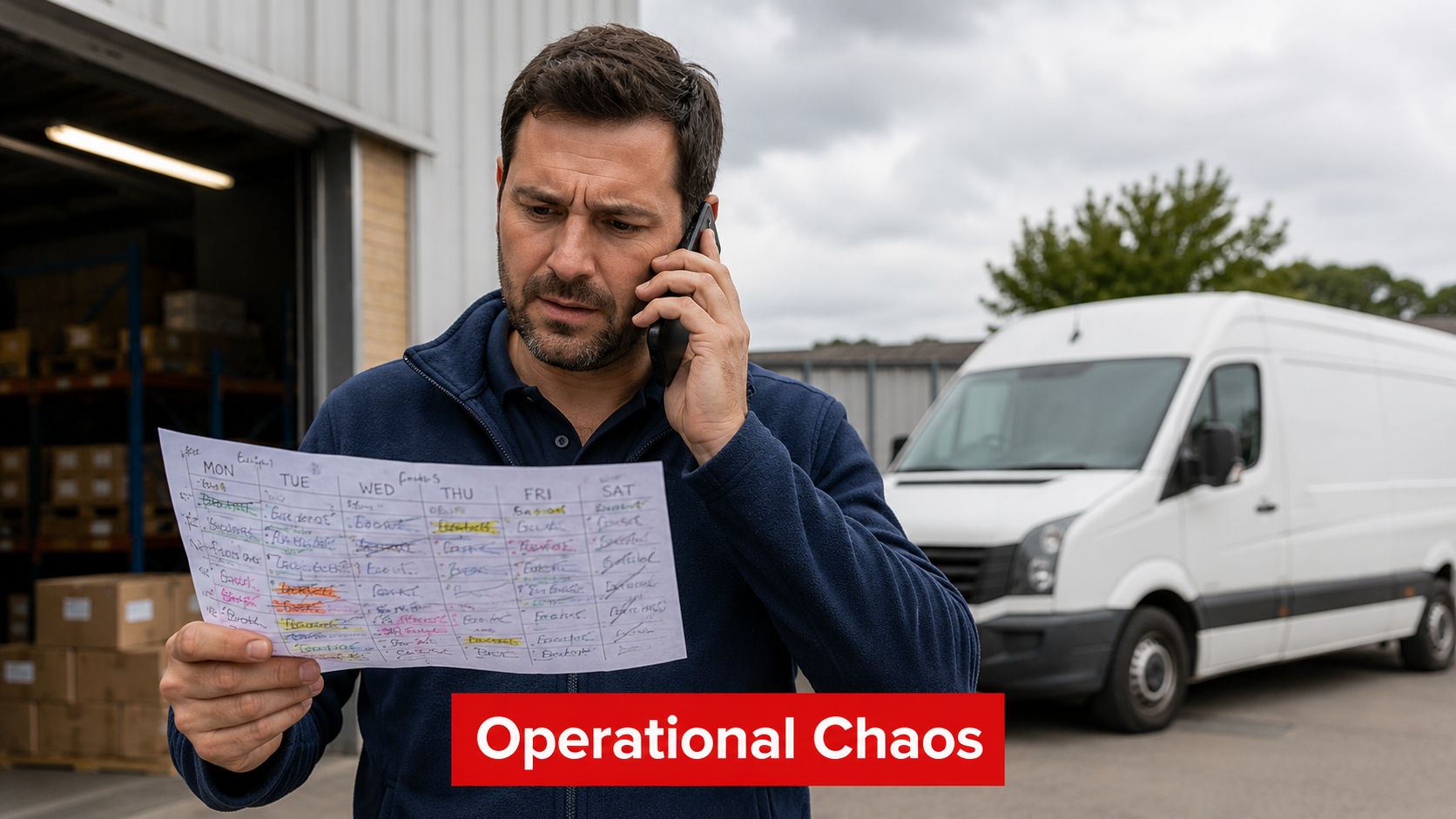
Why the smallest fleets feel the biggest pain
For a local contractor, locksmith, pest control operator, plumber, mobile repair team, or courier service, dispatch friction shows up everywhere:
- Unclear vehicle location: The office can't give a reliable ETA because nobody knows which technician is closest.
- Fuel waste hiding in plain sight: Long idle periods, detours, and unnecessary backtracking don't look dramatic on a single day. They add up across weeks.
- Security gaps after hours: A van parked at home, in a shared lot, or outside a job site is still a business asset.
- Maintenance blind spots: A small fleet has less slack. When one vehicle is down, the schedule often breaks with it.
Many businesses also pair tracking with broader operational tools. If you run technicians rather than pure delivery routes, this overview of AI solutions for field service operations is useful because it connects dispatch, scheduling, and field visibility into the same decision flow.
Small fleets don't need enterprise complexity. They need dependable visibility, fast alerts, and records they can act on today.
The shift has been practical, not theoretical. Tracking systems now sit at the intersection of operations and vehicle security. For a one-owner fleet, that might mean movement alerts and trip history. For a twenty-vehicle service fleet, it might mean dispatch support, maintenance planning, and proof of service activity from the same data stream.
How Fleet Tracking Technology Actually Works
At a technical level, a fleet tracker is a telematics pipeline. That sounds more complicated than it is. Think of it as a digital supervisor inside the vehicle. It collects what the vehicle is doing, sends that information out over a network, and turns it into a dashboard someone in the office can use.
According to HOS247's explanation of small-business fleet tracking, the system combines an in-vehicle GPS receiver, cellular backhaul, and cloud analytics. The device calculates position from satellite signals, then sends location, speed, idle time, route history, and vehicle or engine data to software in near real time.
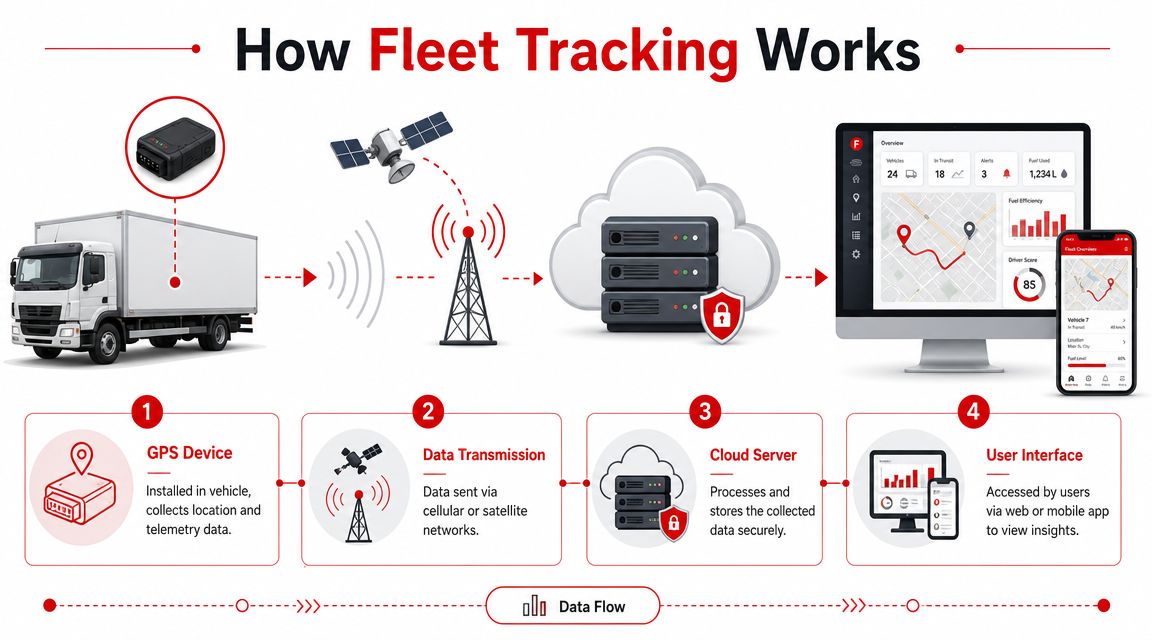
The four parts that matter
Device in the vehicle
This is the hardware. It may plug into the OBD-II port or be wired into the vehicle. Its job is to gather data.Satellite and network connection
GPS handles positioning. Cellular connectivity sends the data back to the platform.Cloud platform
On the cloud platform, raw pings become readable records, alerts, trip logs, and dashboards.Web or mobile app
The owner, dispatcher, or manager sees the result here.
Why it's more than a dot on a map
Good systems don't stop at latitude and longitude. Many also read diagnostic information through OBD-II or CAN bus connections. That's how platforms can surface engine-health signals and diagnostic trouble codes before a roadside failure shuts down the day.
That difference matters most in a small fleet. If one of three vans goes out of service, you don't just lose a vehicle. You lose schedule capacity, customer confidence, and often the ability to reshuffle work.
A lot of owners also combine tracking with safety hardware. If driver accountability and incident review matter in your operation, this overview of essential driving safety tech shows how dash camera systems can complement location and trip data.
For vehicle-level monitoring, tools like the CarLock device features show how modern trackers can add alerts for movement, engine starts, vibration, towing, and tampering. That's especially relevant when the same business vehicle has to serve both operational and anti-theft roles.
If your tracker only tells you where a van was, you're using a fraction of what telematics can do.
Another practical benchmark from small-fleet deployments is update frequency. Real-time updates may arrive every 10 to 60 seconds, depending on provider settings, as noted in the Autosist small-business tracking guide. Faster updates help with dispatch. Slower intervals may be enough for basic oversight and theft visibility.
Core Benefits for Small Business Fleets
The benefits become obvious when you look at the daily friction points inside a small operation. The map is useful, but the primary payoff comes from what the data lets you correct.
Cost control that shows up in routine operations
Fuel waste is usually the first leak to surface. Excess idling, route drift, and unnecessary vehicle use all show up in trip records. Once you can see those patterns, you can coach drivers, tighten dispatching, and stop paying for avoidable miles.
Maintenance is the second leak. A reactive maintenance approach is expensive for any fleet, but it's brutal for a small one. Vehicle-health monitoring helps operators catch trouble earlier, and resources like vehicle health monitoring for connected cars show how tracking data can support that shift from late discovery to earlier action.
Productivity gains without adding more vehicles
Very small fleets rarely have enough spare capacity to absorb wasted time. Better visibility helps in simple, practical ways:
- Dispatching the nearest vehicle: The office stops guessing which driver can realistically take the next call.
- Giving credible ETAs: Customers get a tighter arrival window because you're looking at current trip progress, not a driver's rough estimate.
- Confirming hours and routes: If a day runs long, managers can review what happened instead of debating memory.
A common example is a service business with four vans and a fully booked afternoon. If one technician finishes early on the opposite side of town, that's not useful. If another is ten minutes away from the urgent call and the office can see it immediately, the business recovers the schedule.
Security and driver accountability
Small fleet owners often come to tracking because of theft concerns, then stay for the operational value. That's a normal pattern.
A system that logs movement, route history, and after-hours activity can help with:
- Unauthorized vehicle use
- Theft response and recovery support
- Monitoring harsh driving patterns
- Checking whether a vehicle left or entered a key area
A tracked vehicle is easier to recover. A recorded trip is easier to manage. A visible driving pattern is easier to coach.
This is also where very small fleets should think differently from large enterprise fleets. You may not need a complex platform with layers of analytics. You do need records you trust, alerts that arrive when something is wrong, and enough visibility to protect both the vehicle and the workday.
Essential Features Your Tracking System Must Have
Shopping by monthly price alone is how small fleets end up replacing a tracker they just bought. The cheapest device often looks fine on a comparison page. The problem starts when it misses alerts, loses coverage, or stops reporting at the exact moment you need it.
Start with functions that solve real problems
For a fleet of 1 to 20 vehicles, the feature list should be short but essential.
- Trip history: You need more than live position. Historical routes settle disputes, support payroll review, and expose route inefficiency.
- Geofencing: Set alerts for entering or leaving yards, job sites, storage lots, or home parking zones.
- Driver behavior visibility: Speeding, harsh braking, and aggressive acceleration aren't just coaching issues. They affect fuel use, wear, and risk.
- Maintenance reminders and fault visibility: A small fleet can't afford surprise downtime.
- Tamper and power-loss awareness: If the device is unplugged or power behavior changes, you want to know quickly.
- Usable app design: If the app is slow or cluttered, owners stop checking it. That kills adoption.
If you want to see the app side of that equation, the CarLock app features overview is a useful example of how alerts, trip history, and driver-event data can be surfaced in a mobile workflow.
Reliability is a feature, not a footnote
The operational downside of cheap GPS tracking is often hidden until something goes wrong. The GPX analysis of small-business fleet tracking trade-offs points out the core risks: weak cellular coverage, poor power management, and manual recovery after tampering. For businesses in rural logistics, construction, or high-theft urban garages, paying more for resilient connectivity can be justified by better reporting continuity and faster recovery after theft or tampering.
That's the issue many small buyers miss. A low monthly bill looks efficient until a dead zone wipes out continuity or a tampered unit goes silent.
Practical rule: If the tracker is part of your theft response plan, don't buy on subscription price alone. Buy on reporting continuity and tamper awareness.
OBD-II vs. hardwired trackers
Hardware choice affects convenience, security, and durability.
| Feature | OBD-II Plug-and-Play | Hardwired Tracker |
|---|---|---|
| Installation | Fast and simple | More involved |
| Transfer between vehicles | Easy | Less convenient |
| Tamper resistance | Lower | Higher |
| Visibility to driver | Usually obvious | Easier to conceal |
| Fit for temporary fleets | Strong | Moderate |
| Fit for dedicated business vehicles | Good | Strong |
OBD-II devices make sense when you want fast deployment and easy self-installation. Hardwired units make more sense when concealment, tamper resistance, or permanent fleet assignment matters more than convenience.
For very small fleets, I usually advise matching hardware to risk. A lightly used local service van may be fine with plug-and-play. A vehicle parked overnight in exposed areas, carrying tools, or operating in theft-prone locations deserves a more secure setup.
Understanding the Costs and Calculating Your ROI
For a very small fleet, the monthly fee is rarely the hard part. The hard part is paying for a system that looks cheap on paper but misses trips, drops alerts, or fails when a vehicle is moved without permission. Cost matters. Reliability matters more if you expect the tracker to protect revenue, tools, and customer commitments.
For most small business fleets, pricing usually falls into a per-vehicle monthly subscription, with hardware sold separately or bundled. Entry-level options are cheaper because they do less. Higher-cost systems usually add stronger reporting, driver behavior data, dispatch tools, maintenance workflows, and better support. For a 1 to 20 vehicle operation, the right choice sits between two extremes: a basic security tracker that only helps after a problem starts, and a full fleet platform with features you may never use.
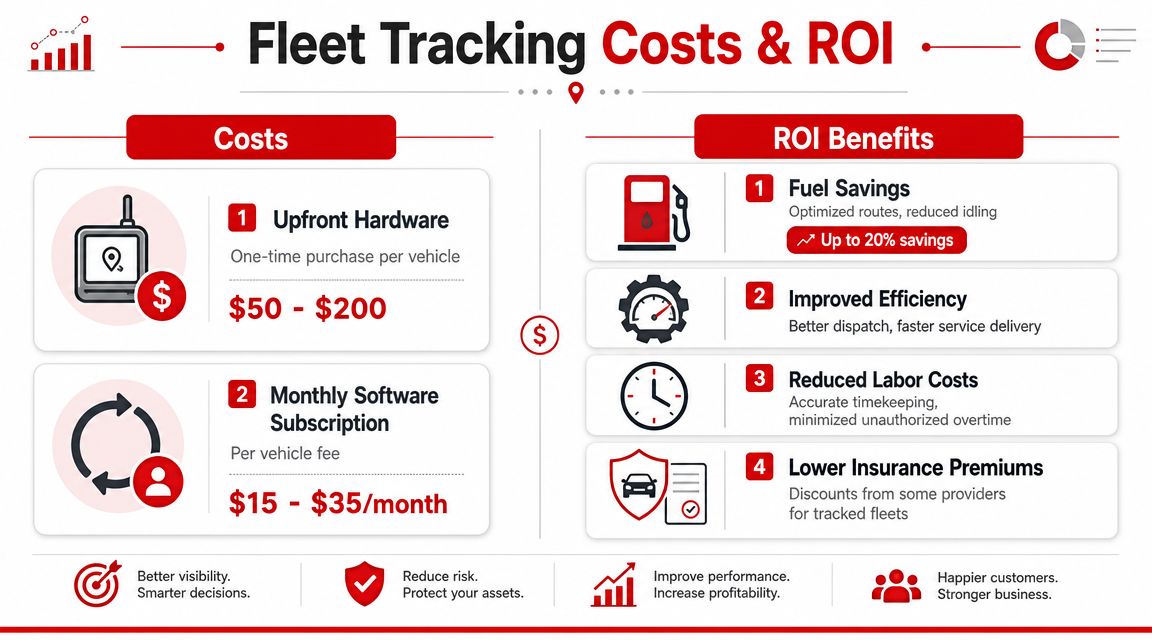
What to count in your own ROI model
Build the ROI model from your own records, not from a sales estimate. One month of fuel logs, time sheets, job completion times, and maintenance invoices is usually enough to see where money leaks out.
Fuel waste you can verify
Look for idling, repeated detours, duplicate trips, and loose routing discipline. In a five-van fleet, even small daily waste adds up quickly because there is no scale to hide it.Labor leakage
Check for long stops, disputed arrival times, after-hours vehicle use, and dispatch time spent calling drivers for updates. Owners often underestimate office time lost to simple location confusion.Maintenance disruption
Count the cost of missed jobs, rental vehicles, overtime, and schedule reshuffling when one truck goes down unexpectedly.Security exposure
For very small fleets, one theft or one unauthorized-use incident can disrupt a meaningful share of weekly capacity. That is why low subscription cost should never be judged in isolation from alert quality and reporting continuity.
This walkthrough adds useful context before you price vendors:
A practical way to judge the spend
Start with one vehicle and one problem. If the issue is after-hours use, measure how often it happens and what it costs. If the issue is poor dispatch visibility, estimate the admin time and missed job capacity tied to that gap. If the issue is theft risk, calculate the impact of losing that vehicle for a day, not just the replacement value.
That approach gives small operators a cleaner decision framework. A low-cost device can make sense if you mainly want movement alerts and basic location history. If you need dependable trip records, maintenance planning, driver accountability, and support when something goes wrong, the cheaper option often stops being the cheaper option.
Reviews help here because they show how systems perform outside a demo, especially on reliability and support. Checking real-world user feedback on CarLock reviews can help you judge whether a platform fits a security-first use case, a light-duty small fleet, or neither.
A good ROI model stays blunt. If the system will not change behavior, reduce wasted time, or lower business risk in a measurable way, do not buy it. If it can prevent one recurring fuel issue, one billing dispute, or one vehicle-loss event, the monthly fee is easier to justify.
Implementation Checklist and Legal Best Practices
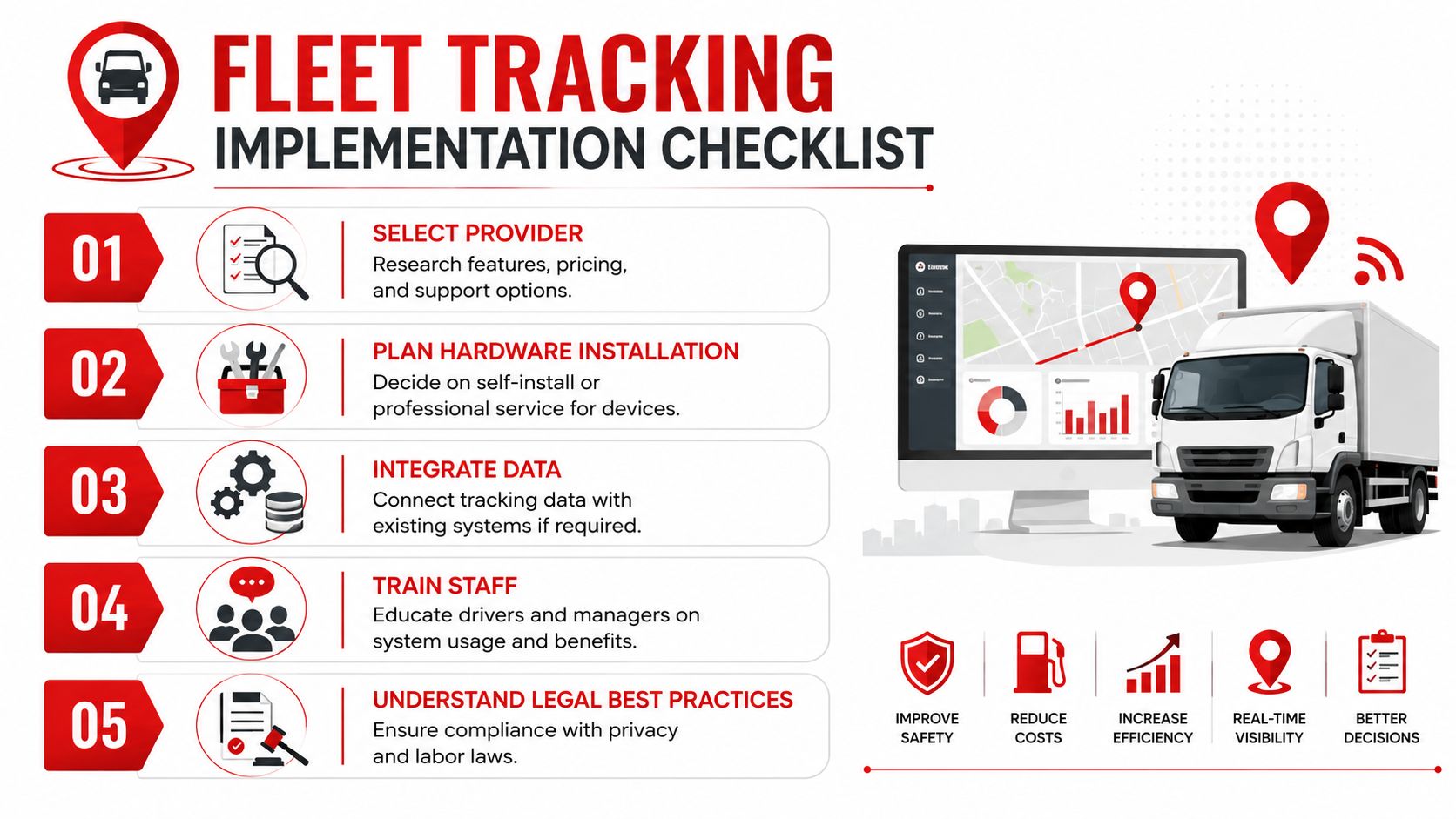
Small fleets usually feel implementation mistakes faster than large ones. In a 3-vehicle or 10-vehicle operation, one bad install, one flood of useless alerts, or one unclear policy can turn the owner against the system before it has a fair chance to prove value.
That is why rollout discipline matters more than feature count. Very small fleets also need to make a sharper distinction than larger companies often do. A tracker that is good enough for theft alerts is not always good enough for payroll review, customer ETA disputes, or maintenance records. Low monthly cost can look attractive until missed trips, offline devices, or weak support create more admin work than the system saves.
The rollout checklist that works
Start with one operating problem and one success measure. For a two-van service business, that might be after-hours vehicle use. For a small delivery fleet, it may be missed proof of arrival. For a contractor, it may be unauthorized weekend movement or difficulty confirming which truck went to which site.
Then work through the setup in this order:
- Define the first use case: Pick the problem you want to fix first, such as theft alerts, route visibility, time-on-site records, or maintenance tracking.
- Match the hardware to the risk: Plug-in devices are easier to deploy, but they are also easier to remove. Hardwired devices take more effort and usually make more sense when tampering, theft, or uninterrupted reporting matters.
- Test signal quality and reporting consistency: Cheap trackers often fail here. Confirm that trips record correctly, parked vehicles still report when needed, and the device reconnects cleanly after weak coverage or battery events.
- Set only the alerts someone will act on: Start with a short list such as ignition on, after-hours movement, towing, geofence exit, or low battery. If no one owns the response, turn that alert off.
- Train the person reviewing the data first: In very small businesses, that is often the owner or office manager. They need to know how to verify trips, spot bad installs, and separate a real issue from a false alert.
- Pilot before scaling: One or two vehicles will show you whether the tracker is reliable enough for daily use and whether the reports support the decisions you make.
A short pilot catches problems that sales demos do not. I have seen small operators buy on price, then discover the tracker missed key trips or stopped reporting in a covered parking area. At that point, the monthly fee is not the actual cost. The actual cost is relying on records that do not hold up when a customer disputes an arrival time or a vehicle disappears.
The legal and employee side
Clear notice prevents more conflict than hidden monitoring ever solves. Drivers generally handle tracking better when the company explains what is being collected, when it applies, and how the information will be used.
A written policy should cover:
- What data is collected
- Which vehicles are tracked
- Whether tracking applies outside work hours
- Who can view location and trip history
- How the business uses the data for scheduling, payroll review, safety, maintenance, or theft response
- How long records are kept
The policy also needs to match local privacy, consent, and labor rules. Those rules vary by state and country, so guessing is a bad approach. Review the CarLock legal terms and compliance information as a starting point, then confirm what your business is required to disclose and document in your location.
Tell drivers before the first install. Get acknowledgment in writing. Keep the policy simple enough that a new employee can read it in a few minutes and understand it without legal translation.
For very small fleets, that level of clarity matters because trust is personal. The owner often knows every driver, and a poorly explained rollout can feel less like process control and more like suspicion. A direct policy keeps the focus where it belongs: protecting vehicles, documenting work accurately, and reducing avoidable disputes.
Your Next Steps to Smarter Fleet Management
The practical case for small business fleet tracking is straightforward. It gives very small fleets a way to manage with evidence instead of phone calls, assumptions, and end-of-month surprises. That matters whether you run two vans or twenty.
The most effective systems do three things well. They make waste visible, they make vehicle activity harder to hide, and they give owners faster warning when something goes wrong. For small fleets, those aren't abstract improvements. They affect daily routing, labor control, customer communication, and theft response.
Start small. Pick one vehicle for one week and log four things: mileage, fuel purchases, idle time you already know about, and any after-hours or off-route use. If you can't measure those basics easily today, that's already telling you something important. Your operation is depending on memory where it should depend on records.
At that point, the next question isn't whether tracking is suitable enough for a small business. It's whether your fleet can keep absorbing preventable waste and unnecessary risk without it.
If you want a practical starting point for vehicle security and fleet visibility, CARLOCK is one option to evaluate. It combines real-time GPS tracking with alerts for movement, engine starts, vibration, towing, battery issues, and device tampering, which can be useful for small businesses that need both operational awareness and anti-theft monitoring in the same vehicle.