


Driver’s Desk
Best Fleet Tracking Systems 2026: A Buyer’s Guide
A dispatcher calls asking why a service van is still across town. A finance lead wants to know why fuel spend jumped again. Then someone notices a trailer or vehicle isn't where it should be. In that moment, “fleet tracking” stops sounding like software and starts sounding like operational control.
That's why choosing among the best fleet tracking systems is rarely about maps alone. It's about whether you can see enough, fast enough, and clearly enough to make decisions before a delay turns into a missed job, a compliance issue, or a theft loss. The harder question isn't which platform has the longest feature list. It's which one gives your team useful visibility without adding cost, friction, or distrust.
The Modern Fleet's Nervous System
At 6:40 a.m., the first missed signal often looks small. A van leaves late. A trailer shows up outside its geofence for ten minutes, then disappears from the map. A driver ignores another phone call from dispatch because they are already handling a customer problem. By noon, what looked like three separate issues has become one operations problem: weak visibility, slow response, and no clear record of what happened.
That is why fleet tracking now sits closer to core operating infrastructure than optional software. The best systems do more than plot dots on a map. They collect location, vehicle status, trip history, and alerts in one place so dispatch, maintenance, and management teams can act from the same record instead of arguing over fragments.
The distinction matters most during disruptions. A basic tracker can confirm where a vehicle was. A stronger platform helps a team decide what to do next, whether that means rerouting a job, checking for battery disconnects, confirming unauthorized movement, or pulling a vehicle out of service before a fault becomes a roadside event. Operational resilience starts there.
It also changes how buyers should define "tracking." Many products sold under that label are still little more than location reporting with a cleaner interface. That can work for simple visibility. It is often inadequate for theft recovery or mixed-asset security, where delayed pings, weak tamper alerts, or poor historical records limit what a business can prove after something goes missing.
Cloud design is part of that gap. Systems built around centralized data and shared access tend to support faster alerting, cleaner trip histories, and better coordination across teams than tools that only send periodic updates from a device. Fleet owners comparing vendors should look closely at how cloud-connected tracking workflows affect alert delivery, record retention, and who can access the information without creating extra admin work.
For moving companies, field service fleets, and regional delivery operators, the payoff is not just efficiency. It is continuity under pressure. If you are trying to optimize your moving fleet, choose technology that holds up during exceptions, not only during normal routes.
One more point often gets missed early in the buying process. A fleet system is also a workplace surveillance tool from the driver's perspective. If managers deploy detailed tracking without clear policies on off-hours use, alert review, and who sees what, the rollout can create resistance that undermines adoption. The strongest systems support control and trust at the same time. They give managers evidence they can use, and they give drivers rules that feel specific, limited, and fair.
A useful test is simple: if the platform cannot help you protect assets, document events, and earn employee buy-in, it is not the fleet's nervous system. It is another feed of raw signals.
Essential Fleet Tracking Evaluation Criteria
Before you compare brands, build a scorecard. Fleet managers don't judge systems by map quality alone. The most useful benchmarks are compliance rate, fuel efficiency, vehicle uptime, driver safety score, and cost per mile, which Fleet Rabbit identifies as core fleet technology performance metrics.
Start with operational outcomes
A fleet platform should improve a process you already care about. If it doesn't change dispatch quality, maintenance timing, driving behavior, or overall vehicle utilization, it's just another dashboard.
Use these five outcome questions first:
- Compliance performance: Can the system help you monitor the rules and workflows your fleet follows?
- Fuel discipline: Does it expose idling, route inefficiency, or driving patterns that affect fuel efficiency?
- Vehicle uptime: Can managers identify maintenance-related risk before a unit drops out of service?
- Driver behavior: Does the platform support coaching through useful behavior signals rather than constant noise?
- Cost per mile: Can you connect tracking data to an operating cost benchmark that management already understands?
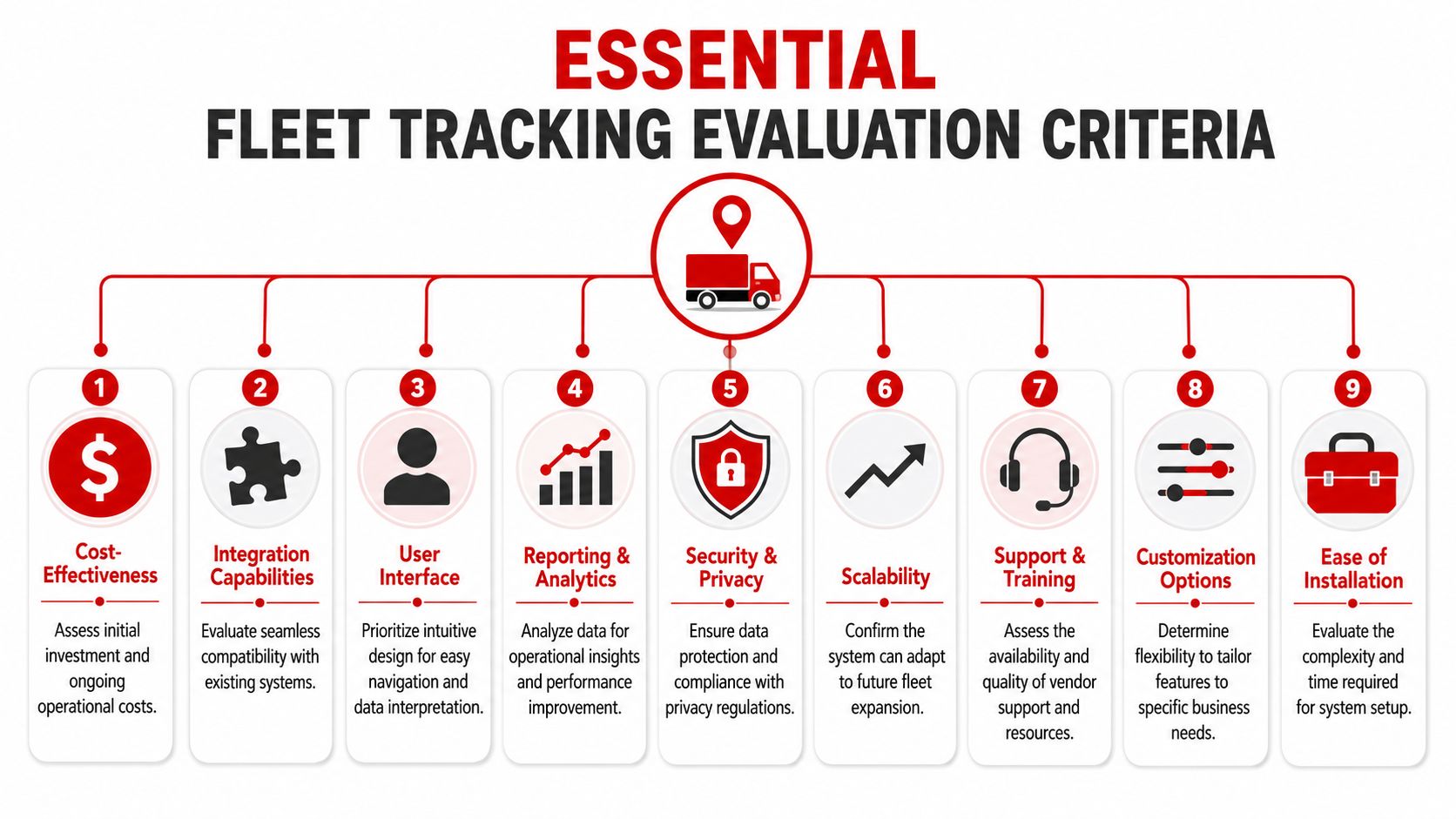
Evaluate the nine buying criteria
Not every criterion carries the same weight for every fleet. Still, these nine separate strong systems from impressive demos.
Tracking responsiveness
Real-time means different things across the market. You need to know how often the system refreshes, how reliable those updates are, and whether alerts arrive quickly enough to matter operationally.Data depth
Some tools stop at location. Others layer in driver behavior, trip history, maintenance triggers, and engine-related information. Depth only helps if someone in your team will use it.Hardware reliability
A clever platform can't compensate for a weak device. Ask how the hardware is installed, how visible it is, whether it depends on vehicle power, and what happens if it's disconnected.Alert customization
Fleets need different thresholds. A delivery team may care about route deviation. A service fleet may care more about after-hours movement or excessive idling. Generic alerts create alert fatigue.Reporting and analytics
Good reporting turns data into management actions. That includes route history, exception-based alerts, recurring summaries, and data that supervisors can review without specialist help. For many teams, route history visibility is the first report that reveals dispatch inefficiencies or unauthorized use.Integration capability
If data has to be copied manually into payroll, maintenance, or dispatch tools, the value drops fast. Ask what the system can share and where it can send it.Security and privacy controls
Buyers often skip this until rollout problems begin. You need role-based access, clear data retention settings, and a policy for who can see what.Pricing model
Subscription cost is only part of total cost. You should also ask about hardware, installation, contract terms, and any added charges for expanded functionality.Support quality
The difference between a usable platform and an abandoned one often comes down to onboarding, training, and issue resolution.
A vendor demo usually shows everything the software can do. Your job is to find out what your team will still use after the first month.
A practical buying test is to ask each vendor to show how one dispatcher, one operations manager, and one owner would each use the same system differently. If they can't do that clearly, the platform may be broad but not operationally grounded.
Comparing Fleet Tracking System Categories
Most buyers make the search harder than it needs to be. They compare dozens of vendors at once, even though the market usually breaks into three functional categories. Once you know which category fits your fleet, the shortlist gets much smaller.
For technical selection, GPS-based fleet systems should support real-time tracking with refresh intervals ranging from 15 seconds to 5 minutes, along with geofencing, driver-behavior monitoring, and maintenance alerts. The same guidance notes that GPS and cellular fleet tracking offers unlimited-range visibility, while Bluetooth-style tracking is limited to roughly 10–100 meters and suits indoor inventory more than vehicle fleets, according to the U.S. Chamber of Commerce guide to GPS fleet tracking systems.
Fleet tracking system categories compared
| Category | Primary Use Case | Typical Cost | Key Features | Ideal Fleet |
|---|---|---|---|---|
| Basic GPS plug-and-play trackers | Simple location awareness and trip visibility | Usually at the lower end of market pricing, depending on hardware and service terms | Live location, basic trip logs, simple alerts | Small fleets that need straightforward oversight |
| Full-featured telematics platforms | Operations, compliance, dispatch, maintenance, and driver management | Often aligned with mainstream per-vehicle subscription pricing, with added cost for advanced modules | Real-time tracking, geofencing, driver behavior, maintenance alerts, reporting, integrations | Medium to large fleets with process complexity |
| Specialized security and asset recovery systems | Theft deterrence, tamper awareness, after-hours movement, recovery support | Varies by device type and security feature set | Movement alerts, tamper/disconnect alerts, unauthorized-use detection, trip history | Fleets with high-value vehicles or elevated theft exposure |
Basic trackers work when the question is simple
If your main need is “Where is the vehicle?” a basic GPS tracker can be enough. These tools are often easier to install and easier to train around. They fit owner-operators, micro-fleets, and businesses that don't need deep reporting.
The limitation is obvious after a few months. Once you want maintenance triggers, coaching, compliance workflows, or richer analytics, a location-only tool starts to feel narrow.
Telematics platforms fit process-heavy fleets
This is the category commonly referred to when discussing the best fleet tracking systems. These platforms combine live visibility with broader management functions. They're usually the right fit when dispatch, route planning, safety oversight, and vehicle health all need to sit in one operational system.
They also require more discipline. A team has to define who reviews exceptions, who coaches drivers, and how reports get used. Otherwise, the platform becomes expensive shelfware.
Security-focused systems fill a different gap
A third category deserves more attention than it gets. Security-first systems aren't only about route visibility. They're designed around suspicious movement, towing, unauthorized starts, tampering, or disconnect events. That makes them materially different from software built mainly for optimization.
For buyers comparing device options, it helps to look closely at vehicle tracker hardware characteristics such as installation style, power source, and what happens if someone tries to remove the tracker. A system can have elegant reporting and still be weak in a theft scenario.
The market often treats efficiency and security as the same problem. They overlap, but they aren't identical. A good dispatch platform isn't automatically a strong recovery tool.
The category choice should follow the operational risk. If your biggest issue is wasted mileage, choose accordingly. If it's unauthorized use, mixed assets, or theft exposure, a security-oriented stack may be the more rational choice even if it has fewer fleet management modules.
Real-World Scenarios and Vendor Profiles
A fleet manager replacing three stolen vans in one quarter is solving a different problem than a dispatcher trying to trim route times by six minutes per stop. Both may shop under the label of “fleet tracking,” but the right answer depends on what failure is most expensive in your operation.
Pricing alone should force that conversation. Fleet tracking can range from relatively modest monthly subscriptions to much higher per-vehicle costs once cameras, compliance tools, maintenance workflows, and custom integrations are added. As noted earlier, buyers should look past map visibility and ask which operational risks the platform reduces.

Large logistics fleets
Large logistics fleets usually need a system that supports many users, formal workflows, and broad telematics coverage across the business. In these cases, enterprise platforms such as Samsara often enter the conversation because they can combine location data, driver behavior, maintenance signals, and reporting in one environment.
The attraction is clear. Operations leaders get a shared system of record instead of separate tools for dispatch, safety, and vehicle oversight. The risk is underuse. If the fleet lacks a clear review process for exceptions, coaching, and escalation, a powerful platform can turn into an expensive reporting layer that drivers resent and managers barely use.
Mid-sized service and field fleets
Mid-sized service fleets often face the toughest tradeoff. They need more than a dot on a map, but they may not have the staff or budget to support a heavy enterprise deployment.
Platforms like Verizon Connect are often a practical fit when dispatch visibility, utilization, and supervisor oversight matter more than deep customization. The deciding factor is rarely the longest feature list. It is whether branch managers can act on alerts during a normal workday, and whether drivers see the system as a tool for service reliability instead of constant monitoring. Fleets that pair tracking data with coaching around essential road safety usually get better adoption than fleets that introduce the software only as a control mechanism.
High-risk vehicles and security-sensitive fleets
Some fleets have a very different exposure profile. A contractor with expensive pickup trucks, a luxury transport operator, or a business with vehicles parked off-site overnight may care less about route optimization than about towing alerts, unauthorized starts, and fast notification after tampering.
That is the gap many general fleet platforms do not fully close. They record trips well. They are not always designed around active theft response. CARLOCK fits this use case as a GPS and smart car security option focused on movement alerts, engine starts, towing, disconnect events, battery issues, and trip history. For a practical view of how the product performs in day-to-day use, review this CARLOCK customer feedback and review history.
The distinction matters because recovery windows are short. A platform built mainly for reporting may help reconstruct an incident later. A security-oriented system is designed to alert someone while the incident is still unfolding, which is a different operational outcome.
A practical way to profile vendors
A better buying question is not “Which vendor has the most features?” It is “Which vendor fits our dominant operating risk, staffing model, and budget discipline?”
- Enterprise telematics vendors: Stronger fit for fleets with formal processes, multiple managers, compliance demands, and the internal capacity to administer a larger system.
- Mainstream fleet platforms: Better for fleets that need balanced control over routing, utilization, service performance, and day-to-day supervision.
- Security-focused trackers: Better for fleets where unauthorized use, tampering, off-hours movement, or theft recovery carries outsized financial risk.
Buy for the failure mode that causes the most operational disruption. Delays, idle time, and route inefficiency point one way. Theft exposure, misuse, and weak recovery readiness point another.
That approach usually leads to a cleaner shortlist, lower software waste, and a tracking stack that holds up under real-world pressure, not just in a sales demo.
The Human Factor Security and Trust
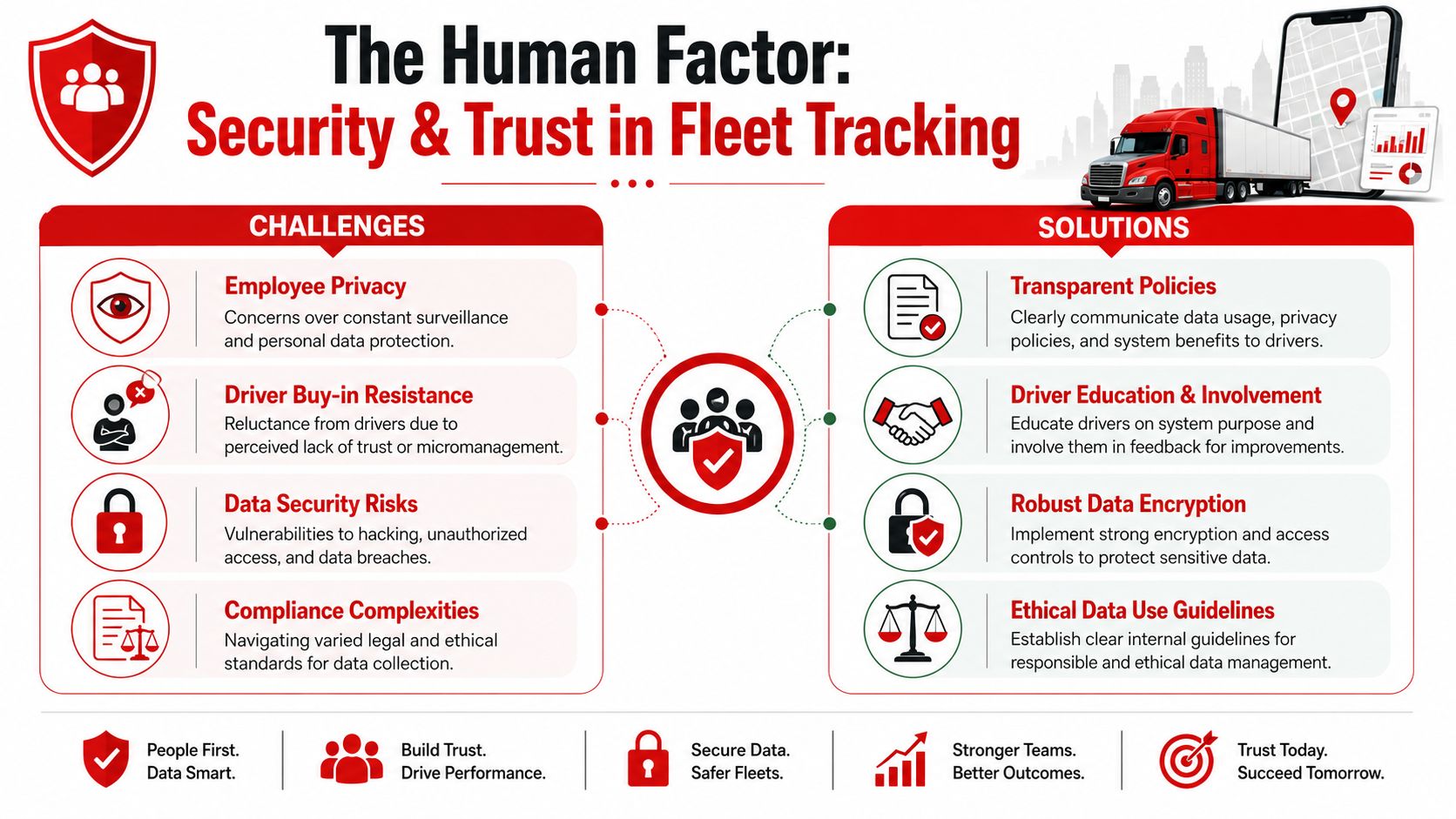
Many fleet rollouts fail for reasons buyers don't discuss during procurement. The software works. The alerts arrive. The reports look polished. Then drivers decide the system is a surveillance tool, supervisors use it inconsistently, and legal or HR questions show up after deployment.
That blind spot is real. Many comparison pages focus on live maps, compliance, safety, and operational telemetry, but under-address privacy, consent, and workforce trust. Expert Market's guidance highlights a useful takeaway: the “best” system isn't always the one with the most sensors, and a narrower, policy-driven deployment may reduce employee pushback while still capturing the data that matters most for the business, as discussed in Expert Market's fleet GPS tracking analysis.
Privacy policy is part of system design
A fleet manager may think the buying decision is technical, but drivers experience it as policy. They want to know when they're being tracked, what gets recorded, who can see it, and whether it's used for safety or constant scrutiny.
Good rollout practice usually includes:
- Clear notice: Tell drivers what the system captures and when.
- Defined access: Limit who can view live location and behavior data.
- Purpose limits: Use the data for stated operational and safety reasons.
- Review discipline: Avoid checking data casually when no operational reason exists.
For any company comparing vendors, the platform's own privacy information and data handling approach should be part of due diligence, not a legal footnote after the contract is signed.
Security means more than seeing a dot move
A separate mistake is assuming any GPS tracker is automatically a theft-recovery tool. It isn't. Some systems are optimized for daily fleet management, not for low-signal conditions, tamper events, or suspicious movement when a vehicle is parked. That gap matters more than most buyers realize.
Samsara's broader market context points to an underserved issue: many buyer guides don't fully answer how tracking works after shutdown, towing, tampering, or low-signal interruptions, even though fleets increasingly want multi-asset visibility and recovery resilience. Refresh speed alone doesn't answer recovery reliability, as explored in Samsara's GPS fleet tracking overview.
A map view helps with management. A tamper-aware alerting system helps with incident response.
That distinction becomes critical when a vehicle disappears outside business hours or a device is unplugged. The best fleet tracking systems for resilience are the ones that match your real risk profile, not the ones with the densest feature matrix.
The driver side matters too. If your safety culture needs reinforcement, practical education around defensive habits and essential road safety can make rollout conversations less adversarial. People accept monitoring more readily when management ties it to risk reduction and fair operating standards, not suspicion.
Choosing the Right System for Your Fleet Size
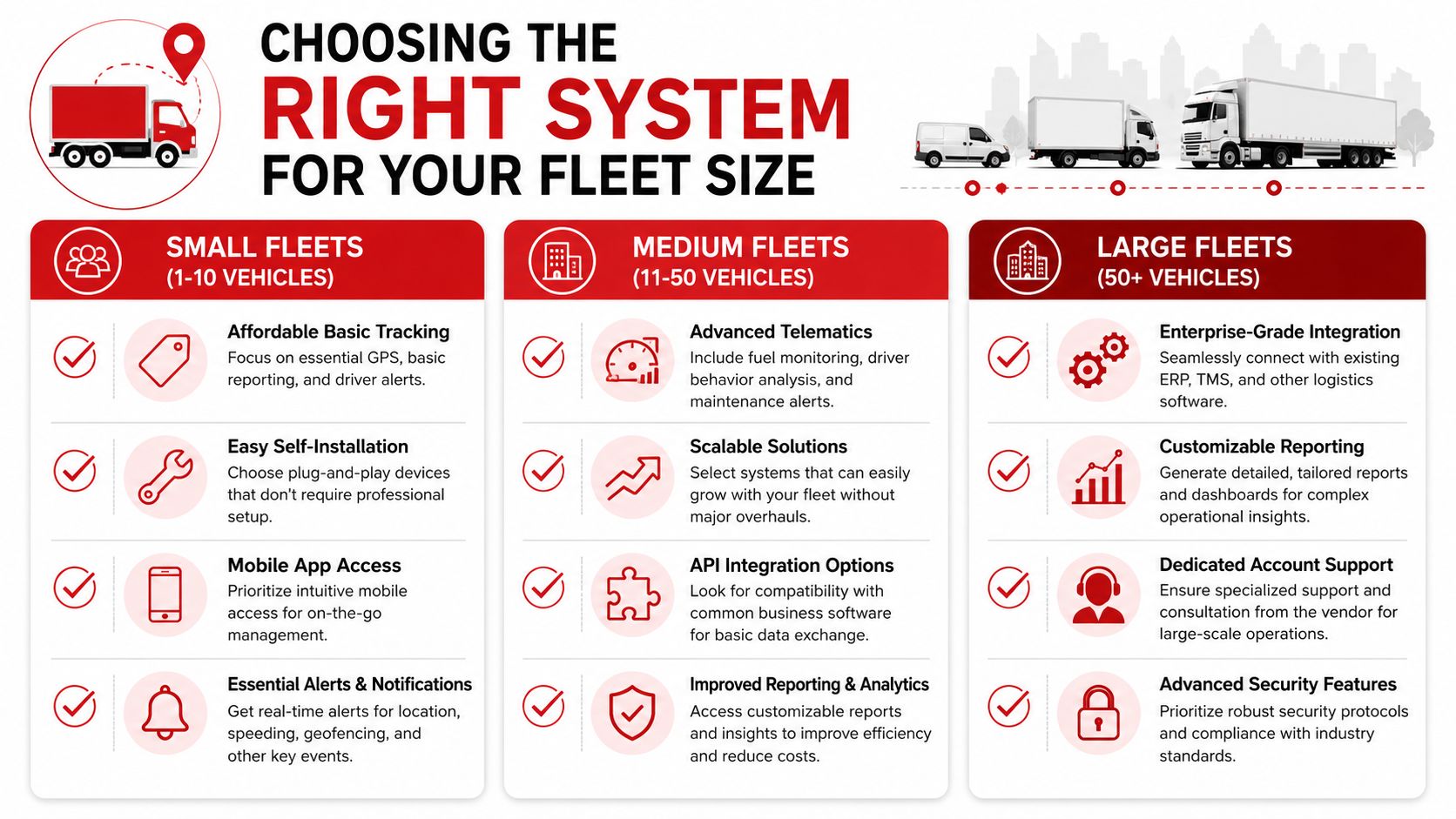
A five-vehicle business and a 500-vehicle operation can buy from the same category, but they should not buy the same way. Fleet size changes more than budget. It changes who reviews alerts, how fast problems need to surface, how much policy detail drivers will accept, and whether tracking is being used for route management, loss prevention, or both.
A smaller fleet often feels each incident more sharply. One stolen van, one unauthorized weekend trip, or one vehicle down for repairs can disrupt customer service for days. A larger fleet has more redundancy, but it also has more failure points, more managers, and more pressure to standardize decisions.
Small fleets
Small fleets usually benefit from restraint. Buying a platform with advanced analytics, maintenance workflows, and layered reporting sounds prudent, but those features only matter if someone has time to review them.
The better fit is often a system that covers a short list of high-cost risks well:
- Reliable location visibility
- Alerts for unauthorized use or after-hours movement
- Simple installation and low admin burden
- Clear driver policy controls
- Basic asset-security signals, not just trip history
The human factor matters more here than many owners expect. In a small team, trust can erode quickly if drivers feel they are being watched without a clear reason. A short written policy, a limited after-hours monitoring scope, and plain-language explanations usually matter more than another dashboard tab.
Ask one practical question first. If the owner, dispatcher, or office manager is the person handling alerts, can they tell within seconds which events require action and which can wait?
Medium fleets
Medium fleets sit in the difficult middle. They need more structure than a small business, but they often do not have a dedicated telematics analyst or a large IT team. Consequently, software decisions start affecting operational resilience, not just efficiency.
A medium fleet should look for enough data to improve dispatch, maintenance timing, and driver coaching, while avoiding a system that floods supervisors with low-value notifications. The right platform should also support gradual expansion. Adding vehicles, users, and reporting rules should not require a system change a year later.
Key evaluation points include:
- Usable telematics depth: trip history, driver behavior data, and vehicle health information that managers can act on
- Scalability: room to add vehicles, trailers, or mixed assets without rebuilding processes
- Alert discipline: configurable notifications so supervisors are not buried in noise
- Workflow fit: exports, permissions, and reporting that match dispatch and admin routines
- Training support: onboarding that helps managers and drivers adopt the system consistently
Medium fleets also need to separate two goals that vendors often blur together. Daily tracking supports service and oversight. Security response requires alerts that are credible enough to trigger action after hours. If theft exposure is rising, test those scenarios directly during vendor review instead of assuming any live map will cover them.
Large fleets
Large fleets need governance more than feature volume. At this scale, the problem is rarely a lack of data. The problem is deciding which teams see which data, which alerts enter which workflow, and how to prevent inconsistent use across regions or departments.
That usually means focusing on:
- Integration architecture: compatibility with dispatch, maintenance, compliance, and finance systems
- Role-based access: different levels of visibility for operations, safety, HR, and executives
- Reporting consistency: common definitions for idling, utilization, exceptions, and policy violations
- Support and implementation: formal onboarding, change management, and account support
- Security controls: audit trails, permission settings, and documented data handling practices
Large fleets also face a bigger privacy challenge. A system may be technically capable of collecting constant driver data, but that does not mean every data point should be retained or widely shared. Resilient programs set limits. They define business use, retention periods, and who can review sensitive events. That protects the company as much as it protects the driver.
A practical decision filter
During vendor calls, use a short screening process before comparing feature lists:
- Define the main operational problem. Dispatch visibility, driver safety, maintenance planning, theft response, and mixed-asset oversight lead to different buying priorities.
- List the incidents that create the most disruption. Late arrivals, unauthorized use, breakdowns, and stolen vehicles do not require the same alerting model.
- Identify who will review alerts each day. A system is only as useful as the person responsible for acting on it.
- Set a privacy standard early. Decide what is monitored, when, and how that policy will be explained to drivers.
- Check total operating fit. Subscription cost, install effort, support quality, and training load matter as much as the feature list.
For teams that want a quick visual walkthrough of fleet management thinking, this video is a useful companion:
The strongest buying decision usually looks narrower than the sales demo. It matches the system to the fleet's real operating risks, the team's ability to manage alerts, and the level of trust the company is prepared to maintain with drivers.
If your priority is protecting vehicles as well as tracking them, CARLOCK is worth evaluating alongside broader fleet platforms. It's a real-time GPS car tracker and security system designed to alert you to unauthorized movement, engine starts, towing, tampering, disconnect events, and battery issues, which can make it a practical fit for small fleets, high-value vehicles, and operations where theft resilience matters as much as day-to-day visibility.