

Driver’s Desk
Vehicle Location History: Monitor & Secure Your Drives
You probably know the feeling already. The car comes back from the shop, your teenager says they're “almost home,” or you're trying to remember whether you really did take that longer route last Tuesday. Vehicle location history turns those fuzzy moments into a record you can check, like a digital diary for your car.
That record matters because it's bigger than a pin on a map. It can show where the vehicle was, when it was there, and how it moved along the way, which is why location history has become central to security, family peace of mind, and fleet oversight. It also raises important questions, because the same breadcrumbs that help you prove a trip can also reveal a lot about your life.
Why Your Car's Past Journeys Matter
A trip log becomes useful the moment memory gets unreliable. A mechanic says the test drive was short, but the route seems longer than expected. A parent waits for a message that a teen driver is home, but the app shows the car still moving. A small business owner looks at a mileage note and wonders whether the numbers were rounded, guessed, or copied from a calendar.
That's where vehicle location history earns its keep. It acts like a digital diary, recording where the car went instead of forcing you to reconstruct the story from receipts, texts, or guesswork. In a security context, that matters because a clean record can help with theft recovery, route verification, and post-incident review, while a messy one can leave you with more questions than answers. For a broader view of how location history ties into security monitoring, CarLock's car security overview is a useful starting point, especially if you want the technical piece to stay grounded in practical protection, CarLock car security.
Why the timeline matters more than the dot
A map showing “where the car is now” only answers one question. The history answers the rest. It can help you see whether a vehicle sat idle for a long time, made an unexpected stop, or took a route that doesn't match the driver's story.
That difference is why people don't just want location, they want context. A single pin can't prove what happened five minutes earlier, but a sequence of positions can reveal a pattern. The more complete the sequence, the easier it is to tell whether the car's behavior was normal, suspicious, or misunderstood.
Practical rule: a location history you can't time-stamp is just a memory aid. A time-stamped record is evidence.
That's also why modern systems have moved far beyond a simple map view. A vehicle history log is now a structured record that can support normal ownership questions as well as security concerns.
How Vehicle Location History Is Created
The first piece of the puzzle is space. The Global Positioning System began with the launch of early satellites in the late 1970s, and the system later grew into a full constellation that made continuous vehicle positioning practical on a global scale, according to High Mobility's GPS location overview. A vehicle device listens for those signals, calculates its position, and turns that position into data an app can use.
From satellites to a usable trip log
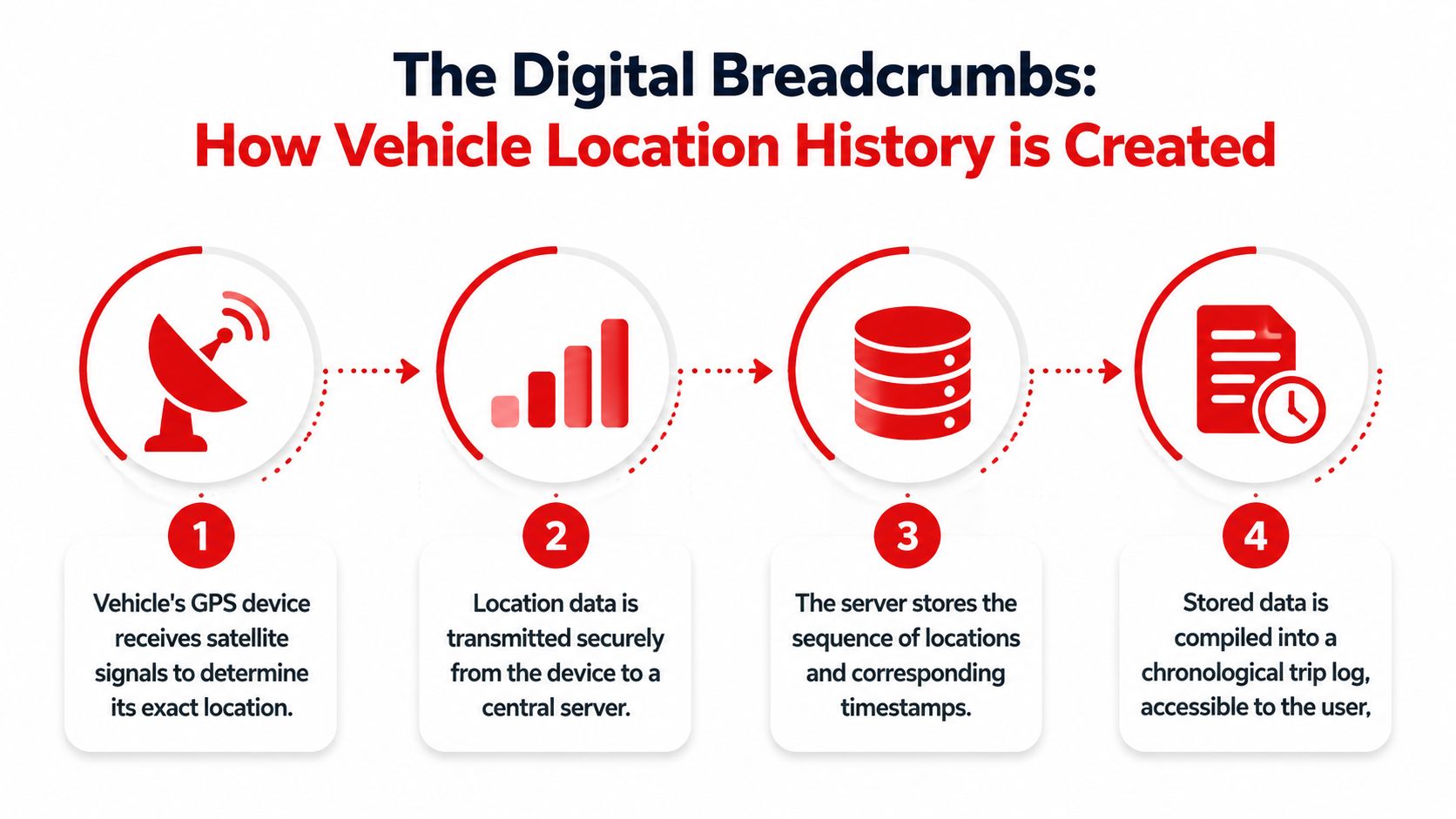
The process leaves digital breadcrumbs. The device in the car receives satellite signals, determines latitude, longitude, altitude, direction, and a timestamp, then sends that information through a cellular connection to a server where the trip can be stored and organized. That chain turns motion into history, the same way a diary turns scattered memories into a record you can reread later.
The key detail is that the device does more than say “car moved.” It can also record signals like ignition on, stops, and other movement events, which makes the history more than a line on a map. For fleet systems, that extra detail turns raw position fixes into an audit trail that supports route reconstruction and investigation, as described in GPS Technologies' fleet tracking guide. If you want a practical example of how device features are presented in a driver-facing app, see CarLock device features.
Some trackers and cloud systems store a “latest snapshot” alongside a separate historical trail, which is the same basic setup used by many vehicle telemetry platforms. The important part is the sequence. A single point tells you where the car was. A sequence shows where it has been.
Why reliability depends on the whole system
A trip history is only as useful as the system behind it. A dedicated GPS and cellular setup is designed to follow the vehicle continuously, while lightweight Bluetooth item finders are built for nearby object recovery, not real-time vehicle security. That difference matters when the car is out of range, parked underground, or being driven away.
A strong deployment also avoids one of the common common IoT solution development pitfalls, where the hardware looks capable but the data path is weak. Device design, connectivity, and storage all have to work together. If they do not, the trip history may look tidy on the surface while missing the pieces you need later.
Accessing and Interpreting Your Trip Logs
A trip log can look simple at first glance, like a digital diary of your car's movements. Open the app, and you may see a route on a map, a start point, an end point, and a few timestamps. Its true significance lies in reading those details carefully and noticing what is missing, delayed, or out of place.
What to look for first
Start with the trip's structure, not just the line on the map. A useful log usually combines time-stamped position points with event details such as ignition, stop duration, and idle time. That mix gives you a movement record that is easier to trust than a single pin dropped on a screen.
The update cadence matters too. Some systems refresh every few seconds, while others wait longer between points, so the spacing in the log can shape how closely the record matches the actual drive. If the points are too far apart, a short detour or brief stop may be easy to miss. If the points are close together, the route usually reads more like the trip itself.
A good trip history should answer a few plain questions:
- When did the vehicle start moving? The start time shows whether the trip matches the expected departure.
- Where did it stop? A stop can be routine, like a fuel break, or something that deserves a second look, like an unexplained parking lot visit.
- How long was the vehicle idle? Idle time can matter for family use, theft concerns, and fleet fuel planning.
- Did the ignition state match the movement? If the vehicle moved but the ignition record looks odd, that may suggest towing, a sensor issue, or a device problem.
The map by itself cannot answer those questions. The log can.
How to read the story behind the route
Route history often tells a clearer story than the summary line at the top of the screen. A short detour may mean nothing. An unexplained gap, a sudden jump, or a long pause in the middle of a drive asks for more context. A parent may want to know whether the car went where it was supposed to go, while a fleet manager may compare the route with notes, service records, or a driver report.
A simple rule helps here. Judge the trip by timing, stops, and whether the movement fits the explanation.
CarLock's app features view is useful for this kind of review because it presents past movement in a way that is easier to read after the fact than a live pin alone. That matters when you are trying to make sense of a drive later, not while it is still happening.
Incomplete logs do not always mean something suspicious happened. A tracker may have lost signal, buffered data for a while, or saved only the range you asked to see. That is why the context around the route matters as much as the route itself.
When to treat a log as evidence and when not to
If you need a record for reimbursement, theft recovery, or a dispute about vehicle use, look for consistency across timestamps, stops, and direction changes. When the history has obvious holes, treat it as a partial record rather than a final answer. A reliable log should support the story, not force you to guess it.
The bigger question is who controls that record and how long it stays available. Some platforms keep trip history inside a customer account, while others let owners or administrators decide what is retained, exported, or deleted. That control matters for privacy as much as for convenience, because a trip log is not just a map. It is a record of where the car has been, and sometimes of where a person has been too. If you need outside help making sense of a record, UK tracing agents often work with movement histories in exactly that evidentiary way.
When you review a log this way, the record becomes more than a route line. It becomes a timeline, and a timeline is only useful if the data behind it is clear enough to trust.
Powerful Use Cases for Location History
A parent checking a teen's drive home wants reassurance, not drama. A theft victim wants a trail that can help law enforcement understand where the car went. A small business owner wants mileage records that don't depend on memory, guesswork, or a half-filled notebook.
Security, safety, and peace of mind
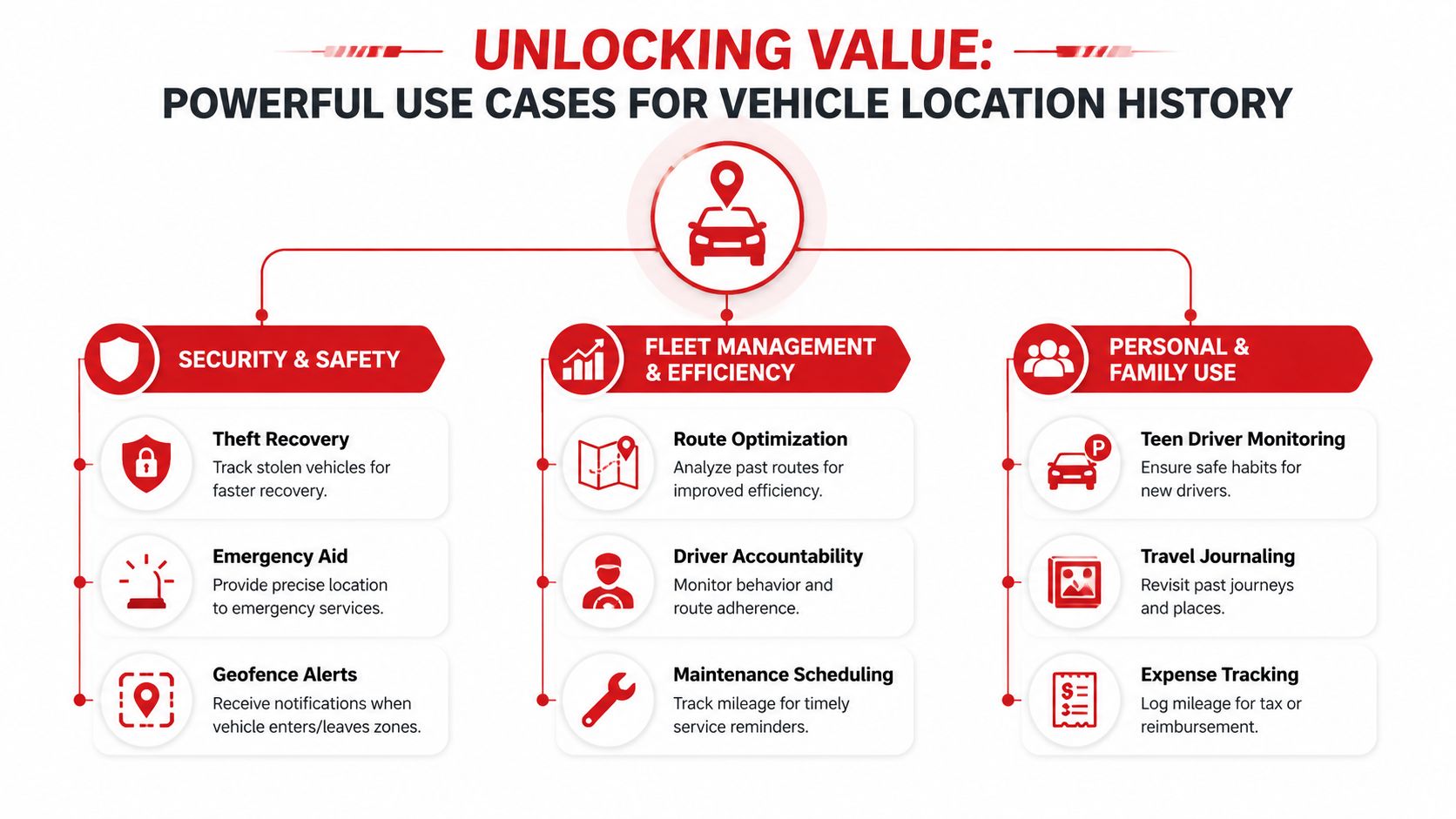
Theft recovery is the most obvious use. A movement record can show the path a stolen vehicle took, which is valuable when police need to understand where it was headed and when it changed direction. That same kind of record can also help confirm whether a vehicle was towed, moved without permission, or taken during a time when nobody expected it to move.
For families, location history can replace a string of anxious texts with a calm review of the actual trip. A parent can see whether the car followed the usual route home, stopped somewhere unexpected, or arrived later than planned. That doesn't just help with enforcement, it opens the door to a conversation based on facts rather than assumptions.
Fleet use and practical records
Small businesses use location history differently, but the logic is the same. Past routes help verify mileage, support expense records, and spot patterns that waste time or fuel. If a delivery van keeps taking an odd route, the trip log gives a manager something concrete to review with the driver.
This is also where outside investigators sometimes get involved. If a vehicle's movement is disputed, professionals such as UK tracing agents may use location clues, timeline patterns, and corroborating records to help reconstruct what happened. The key is that the vehicle history becomes one piece of a larger picture, not a standalone conclusion.
How long history is actually useful
Retention matters here. One GPS-tracking guide says that for cars, “the best GPS tracker is one that can retain records for at least 100 days”, which gives a concrete benchmark for theft recovery, audits, or reconstructing past trips, according to PAJ GPS's travel history guide. A short history window can be enough for a quick check, but it may be too limited for disputes that surface later.
That's why people often ask not just “Can I see where the car went?” but “Can I still see it after the fact?” The answer depends on the system, the storage policy, and how the data is retained.
Understanding Data Privacy and Retention
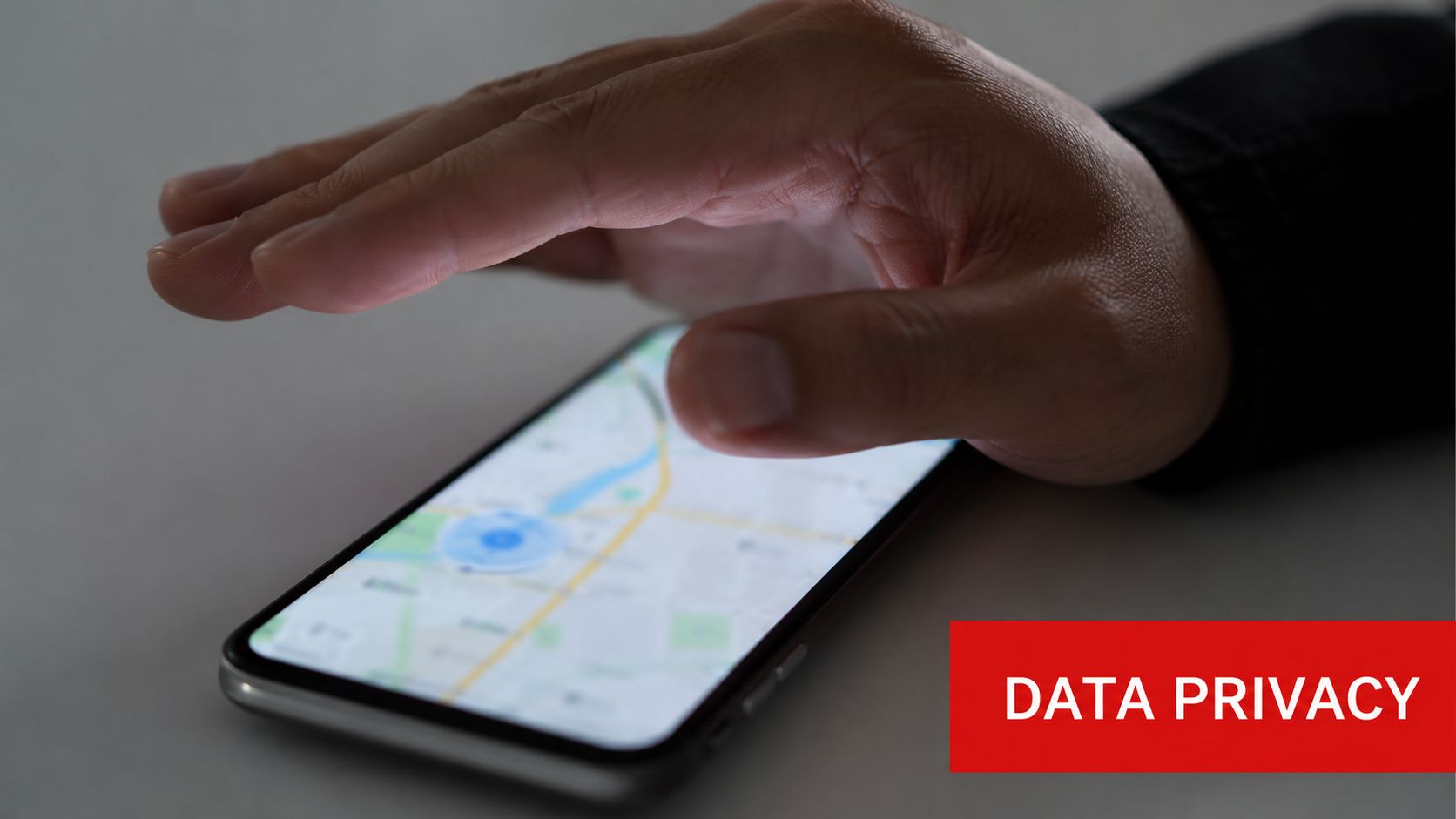
A lot of drivers only think about privacy after they've already looked at the map. Then critical questions emerge. Who else can see this? How long is it stored? If the car changes owners, what happens to the history?
Who sees the data and where it lives
With a manufacturer-connected car, the data path can be complicated. Mozilla notes that modern vehicles can collect information from sensors, connected services, phones, and plug-ins, which means location history may sit alongside a much broader personal data footprint. The Electronic Frontier Foundation also notes that modern cars and their apps can collect background data that may be shared for advertising or insurance risk assessment, and that access or deletion rights depend on state privacy laws, EFF car data privacy guidance.
That's why “who can see it?” isn't a trivial question. In some setups, the history lives in the infotainment system. In others, it's tied to a manufacturer cloud account or a third-party app. Once the vehicle is sold, access can shift, and so can control.
A user-controlled device changes that dynamic. If you're using a dedicated tracker, the history is typically tied to the account that manages the device, which makes the ownership model much clearer. CarLock's privacy page is a good place to review how account-level control is framed in practice, CarLock privacy.
Retention, deletion, and control
Retention isn't just a storage question, it's a control question. A longer history helps with disputes that don't surface right away, while a short one may suit a quick family check but not a theft case or a business audit. Some consumer interfaces even limit how far back you can go. GPS Insight's vehicle history view, for example, opens on the current day and limits historical range to one week, which shows how platform policy can shape what you can recover.
Deletion matters for the same reason. If the data belongs to a manufacturer account, deletion may depend on the provider's process and the applicable state law. If it's a third-party tracker, the account owner usually has a more direct path to manage or remove records. Either way, the safest habit is to know where the data is stored before you need it, not after.
Practical rule: if you can't answer where the history lives, you don't really control it yet.
That's the core privacy issue behind location history. The map is visible in seconds, but the data rights behind it can be much harder to untangle.
Best Practices and Troubleshooting Common Issues
A clean trip history usually comes from boring habits done consistently. Check the device status in the app, confirm alerts are turned on, and make sure the account uses a strong, unique password. Small steps like that help you notice disconnects early instead of finding out after the fact that the record went quiet.
Why a trip log can look wrong
The most common reason for a confusing history is signal quality. GPS/GNSS receivers are commonly cited at 3 to 5 meter accuracy, but signal loss in tunnels or dense urban areas can create gaps, jumps, or route smoothing artifacts, according to US Fleet Tracking's system overview. If the vehicle was underground, in a garage, or inside a city canyon, the map may show a momentary drift that never really happened.
Quality systems reduce that problem with multi-constellation support and store-and-forward buffering, so missed fixes can be uploaded later when the connection returns. That's the technical reason a better tracker often looks calmer and more continuous over time, even when live connectivity gets shaky.
What to do before you assume the data is wrong
- Check the device status first. A disconnected tracker, low battery, or weak cellular link can explain a gap faster than a route review can.
- Compare the history with the vehicle's use. If the log shows a pause, ask whether the car was parked, idling, or in a place where GPS reception was poor.
- Review event data, not just the map. Ignition, stop duration, and idle time often explain what a line on the map can't.
- Treat a single odd point cautiously. One jump doesn't always mean misuse. It may just be a bad fix that got corrected later.
If the record still looks off, the right response is usually to combine the history with other clues, not to trust or reject it blindly. Mileage notes, driver messages, maintenance records, and app alerts can all help fill in the gaps.
A good tracker should make those gaps easier to explain, not harder. When the device, app, and retention settings all work together, the history becomes a reliable reference instead of a source of anxiety.
If you want a clearer view of where your car has been, start by checking the device settings, review your trip log habits, and compare the history against your own records this week. If you're looking for a dedicated vehicle-tracking option that combines live location, trip history, and app-based alerts, take a close look at CARLOCK.