

Driver’s Desk
Fleet Management and Tracking: A Practical Guide for 2026
Your van is parked where it shouldn't be, or a driver's route looks wrong on the map, and now you're trying to answer a simple question fast, where is the vehicle, who moved it, and what happened after that? That's the reason people start looking at fleet management and tracking. The technology isn't just about a blinking dot, it's about getting enough information to protect assets, understand usage, and make decisions without guessing.
What Fleet Management and Tracking Actually Means
A stolen vehicle, an unauthorized after-hours trip, or a truck that sits in the wrong place for half a day all create the same problem, you don't just need a location, you need context. Fleet management and tracking combines that context with vehicle health, driver behavior, and operational reporting so you can react before a small issue turns into downtime, loss, or a messy conversation with a customer.
The difference between a tracker and a fleet system
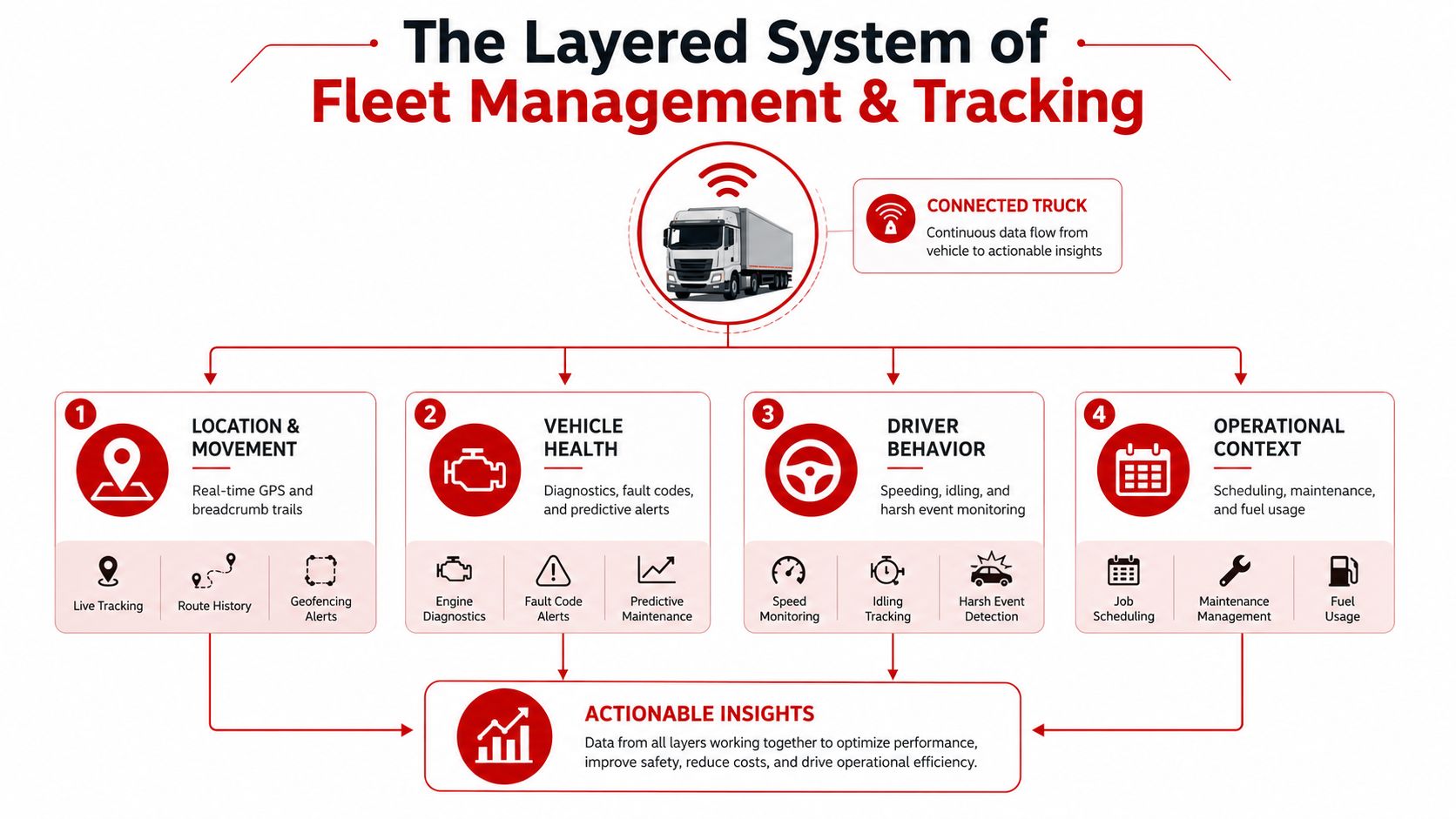
A basic tracker answers one narrow question, where is it now? A fleet system goes further, it helps answer why is it there, what condition is it in, and what should happen next? That broader view is why fleet management is described as a system for managing vehicle position and operational state, not just a map pin, and why modern guides include maintenance, fuel use, driver behavior, and compliance in the same workflow. For a practical overview of efficiency-focused fleet processes, T1A Auto's improve fleet efficiency tips can be a useful companion read.
If you've ever used the CarLock awareness view, the idea is familiar, you're not just checking a spot, you're watching for movement and unusual activity that tells you something changed.
Why that distinction matters for a first-time buyer
A consumer finder can be fine for a bag or keys, but vehicles create a different set of risks. A company car can be driven, towed, tampered with, or left idling, and each of those events matters differently to the owner. That's why a serious tracking setup needs to capture movement plus vehicle state, not just a last known location.
Practical rule: if your main concern is theft or unauthorized movement, you need alerts and historical context, not only a dot on a map.
CarLock sits in the security-first part of this spectrum. It's a real-time GPS car tracker and smart car security system, so it fits people who want vehicle awareness without moving straight into an enterprise fleet stack.
The Core Technologies Behind Modern Tracking
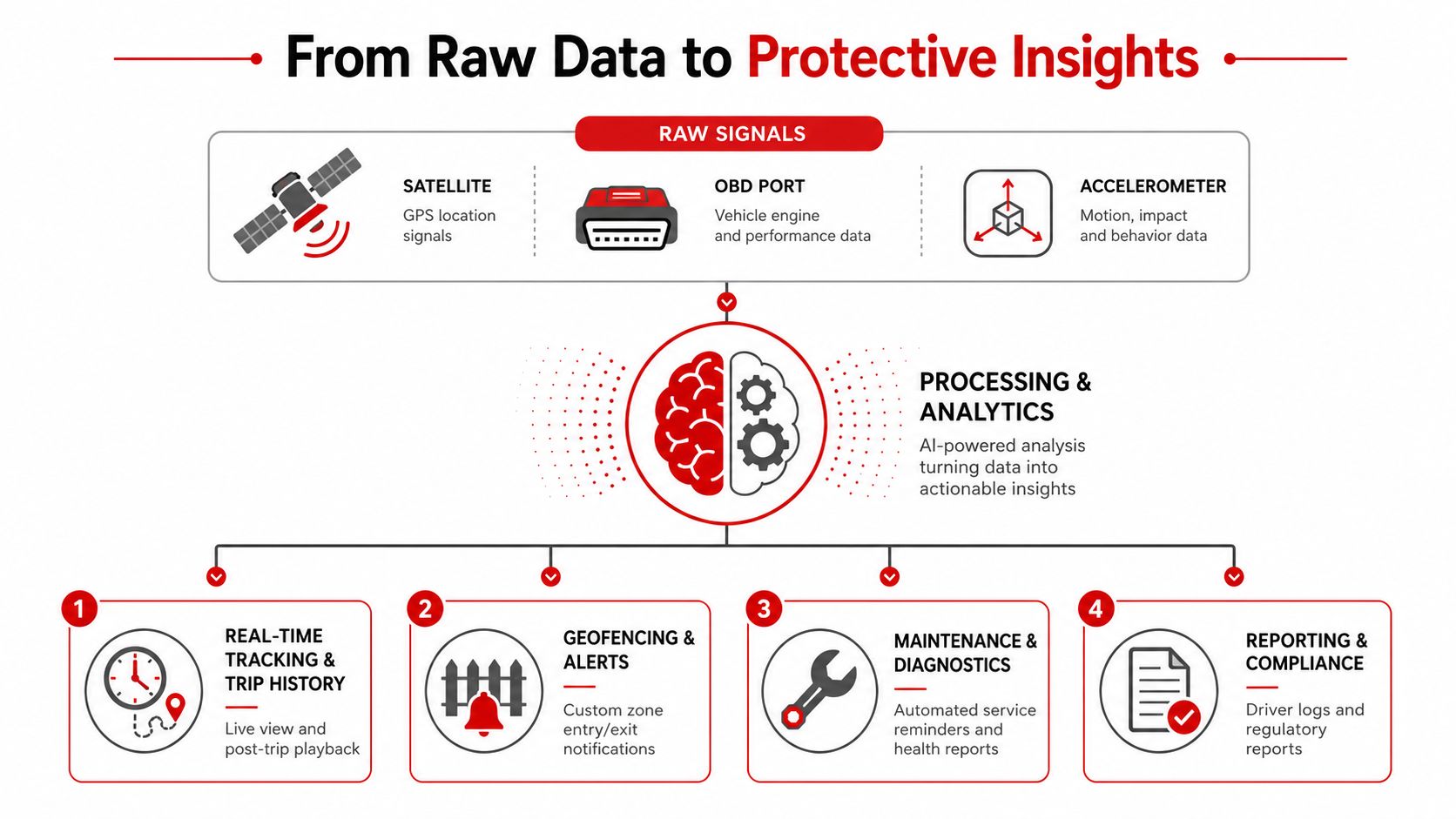
Think of a tracker as a small reporting station installed in the vehicle. It listens for position signals, watches the vehicle's state, and then phones home through cellular networks so the software can turn raw movement into useful information. The hardware matters more than the marketing label, because a tracker is only as good as its signal, power, and reporting reliability.
How the data gets from the vehicle to your screen
GPS satellites provide the vehicle's latitude and longitude, then cellular connectivity moves that data into the cloud for display and alerts. In fleet deployments, telematics devices often stream GPS latitude and longitude, speed, heading, engine RPM, coolant temperature, fuel level, diagnostic trouble codes, accelerometer events, and odometer data every 5 to 30 seconds. At fleet scale, that can amount to roughly 4,000 to 15,000 data points per vehicle per day, depending on drive time and reporting frequency, which is why refresh rate is a trade-off between visibility and transmission load. That trade-off is documented in Acquaint's explanation of fleet data flow and reporting load fleet data volume and refresh rates.
A vendor can make a dashboard look simple, but under the hood the system is doing three jobs at once, collecting signals, transmitting them, and storing them in a way that lets you search trips later. That's the reason route reconstruction and event detection improve when refresh rates are higher, and also why weak coverage or poor cloud handling creates blind spots.
Why hardware and coverage decide whether the system is useful
OBD-II and hardwired connections pull more than location. They can add engine and maintenance signals that a simple location-only device won't see, which is why vendors often position telematics as the bridge between vehicle movement and vehicle condition. Faberwork's proven fleet tracking examples are a good reminder that the value usually appears when location data is tied to a specific operational rule, not when the device just reports where it is.
Bluetooth finders work differently. They depend on nearby phones or devices, so they're better suited to nearby item recovery than ongoing vehicle security. Real GPS plus cellular tracking keeps working in places where there aren't helpful phones nearby, which matters in underground garages, rural roads, or remote yards.
The internal CarLock device feature overview shows why this matters in practice, because the device is designed around vehicle monitoring rather than casual item finding.
If the vehicle operates where coverage is weak, ask the vendor exactly how the device behaves when signal drops, how long it stores data locally, and what happens when it reconnects.
Key Features That Turn Data Into Protection
Raw telemetry doesn't protect anything by itself. Protection starts when the system converts a signal into an action, like an alert, a trip record, or a maintenance reminder. That's why the most useful platforms focus on a small set of features that map directly to real problems, not a long menu of tools nobody uses.
Real-time tracking and trip history
Live location matters most when you need to respond now. A service van moved after hours, a delivery truck taking a strange route, or a family vehicle showing up somewhere unexpected all call for fast verification, not a spreadsheet next day. Trip history adds the second layer, because it lets you replay where the vehicle went and when it stopped.
That same history is what turns a one-off question into a pattern. If you only look at live location, you're reacting to the present. If you look at trip history, you can spot repeat detours, unauthorized side trips, or patterns that suggest the vehicle is being used outside policy.
Geofencing, driver behavior, and maintenance
Geofencing is useful because it creates a boundary around a place you care about. A parent can get an alert if a teenage driver crosses into a school zone or leaves a defined area, while a small business owner can know when a van is moved outside work hours. Driver behavior monitoring adds another layer by flagging speeding, harsh braking, or aggressive cornering, which helps with safety coaching and, in fleet use, with risk awareness.
Maintenance reminders are different because they depend on vehicle state, not just GPS. Mileage, engine hours, and diagnostic trouble codes can trigger service work before a breakdown becomes a roadside problem. That distinction matters, because GPS alone can tell you where a van is, but it can't tell you that the vehicle is overdue for service.
CarLock's security focus fits the first two categories especially well, movement alerts and trip awareness, while hardware-level engine data becomes more important as you move toward full fleet operations. For a broader security-oriented view, the CarLock car security page is the most direct reference point.
Good rule: buy the feature that solves the problem you actually have, not the one that sounds most complete in a demo.
The KPIs and Metrics That Actually Matter
Dashboards get messy fast. The fix is to track a small group of metrics that connect directly to uptime, fuel spend, repair work, and alert response. Fleet managers are often told to focus on 3 to 5 core metrics daily, then review trends weekly and plan budgets monthly, which keeps the program usable instead of turning it into screen clutter. Autosist's cadence advice on daily, weekly, and monthly fleet metrics supports that approach.
The metrics that deserve a spot on the main screen
Utilization rate tells you whether the vehicle is doing productive work or just sitting. Cost per mile turns operating discipline into something you can compare across vehicles or routes. Preventive maintenance on-time completion shows whether the fleet is staying ahead of breakdowns, and mean time to repair shows how quickly you recover when something does fail.
Fleetio's benchmark is useful because it shows how uneven maintenance discipline can be. Fleetio reports an industry average of about 84% on-time preventive maintenance and only around 28% of fleets reaching 95 to 100% completion in the source brief cited here. That gap matters because maintenance triggered from actual mileage, engine hours, and DTC alerts can reduce unscheduled downtime and reactive repair work, which is where cost creeps in.
A simple cadence table
| Cadence | Metric | What It Tells You | Source Signal |
|---|---|---|---|
| Daily | Alerts and incidents | What needs attention right now | Real-time telemetry and notifications |
| Daily | Utilization | Whether vehicles are being used efficiently | Trips, idle time, and location history |
| Weekly | Cost per mile | Whether operating costs are drifting | Fuel, repairs, and route activity |
| Weekly | Mean time to repair | How quickly failures are resolved | Maintenance workflow data |
| Monthly | Preventive maintenance completion | Whether the fleet is staying ahead of breakdowns | Mileage, engine hours, and DTC alerts |
The internal CarLock route history view is a good example of how trip data supports this cadence, because the history layer makes review possible after the live alert has passed.
Review daily for exceptions, weekly for patterns, monthly for budget decisions. That rhythm keeps the data from piling up without action.
Modeling the ROI of Fleet Tracking
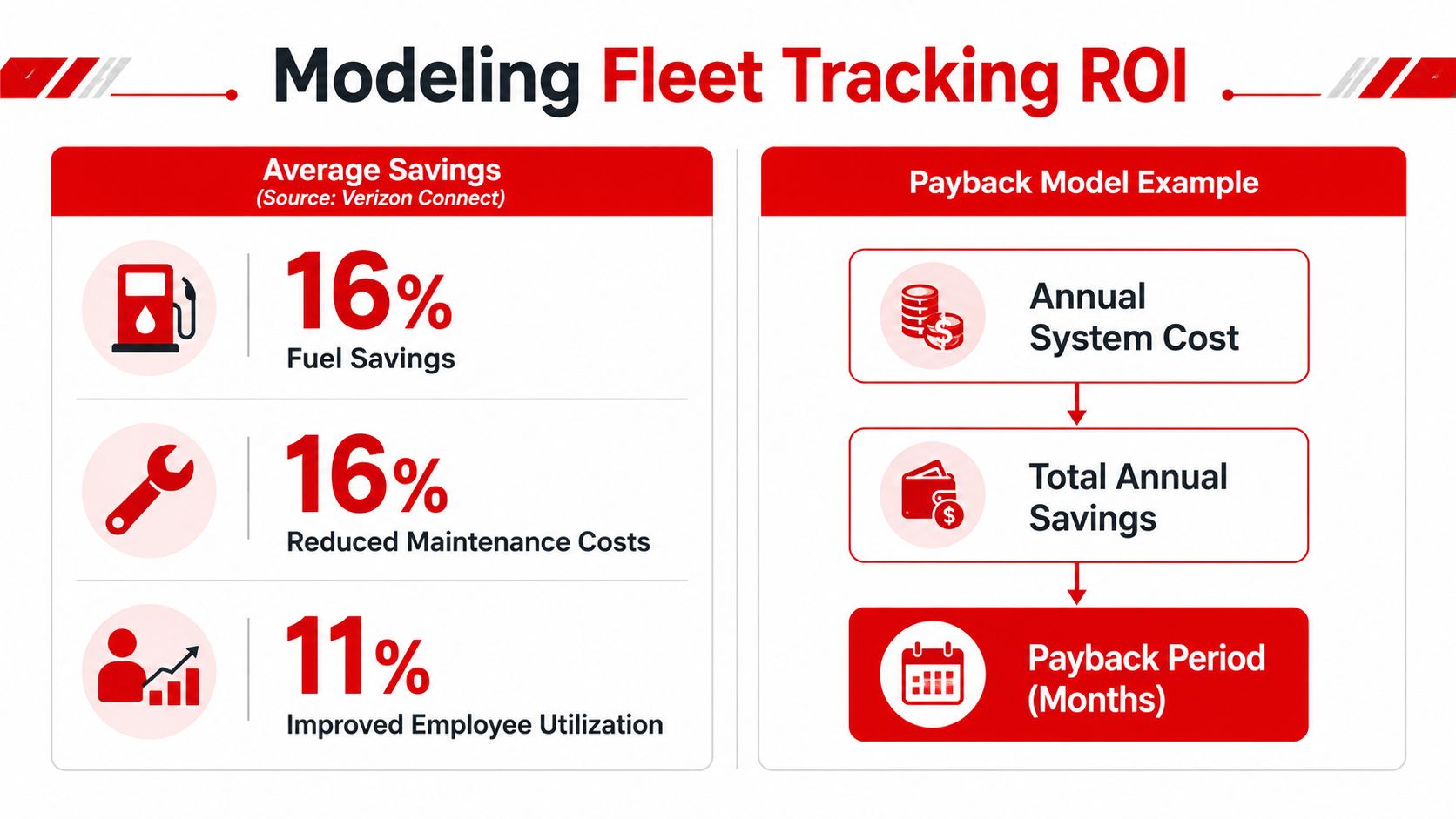
A tracking system only earns its place if the numbers make sense. The cleanest way to judge it is to compare recurring cost against recurring savings, then add the value of avoided loss where that applies. Verizon Connect's 2025 fleet technology report found tracked fleets achieved an average 16% fuel savings and a 16% reduction in labor costs, which is a strong signal that telematics can influence operating cost, not just visibility Verizon Connect fleet technology report.
A simple payback model
Start with your annual fuel spend. If tracking and routing discipline reduce that spend, you can estimate savings using the reported 16% fuel savings figure. Do the same for labor tied to dispatch inefficiency, after-hours misuse, or wasted time on avoidable reroutes, then add the benefit of better utilization and fewer reactive service calls.
The cost side should include the device, the subscription, installation if needed, and the cellular data footprint created by frequent reporting. Higher refresh rates improve dispatch accuracy and event detection, but they also increase transmission volume and cloud load, so the most expensive setup isn't always the most practical one for a smaller fleet. If you want a simple comparison point for service levels and buyer sentiment, the CarLock reviews page is a natural place to check how users describe the experience.
What to include in the calculation
- Fuel savings: apply the reported percentage to your annual fuel spend.
- Labor savings: estimate time recovered from fewer manual check-ins and less wasted driving.
- Theft avoidance: include replacement cost, recovery delay, and business interruption where relevant.
- Maintenance timing: account for fewer emergency repairs when service is triggered earlier.
- System cost: include device, monthly fee, and installation.
If the annual savings are comfortably above the annual system cost, the case is easy. If they're close, the key question becomes risk reduction, especially for high-theft vehicles or assets that are expensive to replace.
A Step-by-Step Implementation Roadmap
The safest way to roll out tracking is to treat it like a controls project, not a gadget purchase. Start with one vehicle or a small subset, learn what alerts matter, and build the process around those signals before you scale. That keeps the rollout manageable whether you're protecting one personal vehicle or a small commercial fleet.
Assess, pilot, expand, govern
Assess first. Write down the actual problem. Theft risk, unauthorized use, route verification, maintenance discipline, or all of the above. A single owner with one van will care about different alerts than a service business with ten vehicles.
Pilot second. Install on two to five vehicles if you can. Watch how often alerts fire, whether the app is easy for the team to use, and whether the data answers the question you started with. CarLock's smartphone-first install and anti-theft alert set make it a natural fit for this early stage when you want quick coverage without a long deployment cycle.
Expand third. Standardize installation, driver onboarding, and notification settings once the pilot is stable. If the vehicles are mixed, decide which ones need only location and which ones need engine or driver-behavior data.
Govern last. Assign who receives alerts, who reviews route history, and how often exceptions get checked. That matters because a tracking system without role clarity turns into noise, and noise gets ignored.
The rollout succeeds when the alerts become part of a decision routine, not when the app looks impressive on day one.
If the fleet grows into more complex routing, compliance, or maintenance workflows, enterprise telematics may make more sense later. The point is to earn that complexity when you need it.
Where Tracking Falls Short and How to Plan Around It
More tracking doesn't automatically mean better fleet performance. In some environments, GPS-only coverage leaves holes, and in some organizations, collecting too much data creates more friction than value. The smart move is to separate the problem of visibility from the problem of decision-making.
Where the system can fail
Low-connectivity sites are the obvious weak point. Underground garages, remote yards, and cross-border routes can all create gaps that make a simple live map less reliable than buyers expect. Mixed-asset fleets create a different issue, because trailers, refrigerated cargo, construction equipment, and backup theft assets don't always behave like a standard road vehicle, and the right tool may be sensors, power management, or asset-specific coverage rather than a generic fleet app.
That's why current industry commentary pushes fleets toward predictive, decision-oriented workflows instead of raw visibility alone. The right question is not only “where is it?” but “what action should happen because of what we see?” A vehicle can be visible and still be hard to manage if the system doesn't support the next decision.
Privacy and labor need a policy, not a guess
Employee-tracked fleets need rules. Who can access location history, which alerts are reviewed, how long records are kept, and what happens when a driver is off shift all deserve a written policy. That's especially important for small fleets, where owners often know drivers personally and can accidentally create tension by over-monitoring without a clear purpose.
If you don't need a data field to protect the vehicle or run the operation, don't collect it just because the platform can. That's the simplest way to lower compliance risk and avoid employee-relations problems that don't improve outcomes.
Decision test: if a tracking feature doesn't change a real action, don't build a policy around it.
How to Choose the Right Fleet Tracking Solution
The right system depends on what you're protecting and how much complexity you can manage. A consumer Bluetooth tracker, a professional telematics platform, and a dedicated anti-theft system all solve different problems, and mixing them up leads to disappointment.
Match the tool to the job
Basic GPS works for simple location awareness. It's the lightest option, but it usually doesn't give you the depth you need for vehicle health or driving patterns.
Mid-tier telematics adds driver behavior, diagnostics, maintenance, and reporting. That makes sense when you run several vehicles, want operational visibility, or need a broader picture of cost and uptime.
Enterprise platforms are built for larger fleets with compliance, integration, and workflow needs that go beyond basic tracking.
For a personal car, a high-theft-area vehicle, or a small fleet that wants straightforward anti-theft protection, CarLock fits the middle of the road between a simple item finder and a heavy enterprise rollout. It uses real GPS and cellular connectivity, so it's designed for vehicle security rather than nearby-device recovery.
Questions to ask any vendor
- Coverage: Will it work where my vehicles operate, including garages or rural roads?
- Alerts: Does it detect movement, towing, tampering, and disconnection?
- Data depth: Can it show trip history, behavior, and maintenance signals, or only location?
- Access control: Who can see what, and can I limit that?
- Install and upkeep: How hard is it to deploy and keep powered?
- Fit: Am I buying security, operations, or both?
If you're weighing vehicle security against fleet oversight, start with the problem you need solved most often, theft, unauthorized use, or operational drift. Visit CARLOCK to review how its real-time GPS tracking, movement alerts, and trip history can support that decision, then compare it against the rest of your fleet workflow before you buy.