

Driver’s Desk
How to Set Up Alerts to Protect Your Vehicle Fast
You're asleep, your car is parked outside, and your phone is silent. In the morning, you find the vehicle moved, a window damaged, or the battery drained. A security system that only records what happened afterward hasn't given you much protection when the important moment was the engine start, the first unauthorized movement, or the tow truck lifting the vehicle.
That's why learning how to set up alerts properly matters. Real-time notifications can help a parent respond when a teenager starts driving, help a fleet manager spot unusual vehicle use, and give an owner a chance to react during a suspected theft. But alerts only work when the phone receives them, the rules match the vehicle's normal environment, and the system avoids so much noise that the user starts muting notifications.
Why Smart Alerts Matter Before You Configure Anything
A vehicle alert isn't just an on or off switch. It's a decision rule that answers three questions: what happened, how serious is it, and who needs to know right now?
Suppose your car is parked on the street overnight. An engine-start alert deserves immediate attention because nobody should be using the vehicle at that moment. A movement alert can be just as important if the car begins rolling without permission. A low-battery warning matters, but it usually doesn't require the same urgent response as tampering or unauthorized driving.
Vehicle theft remains a tracked public-safety issue across major markets. In the United States, the National Highway Traffic Safety Administration's vehicle theft prevention information says more than 650,000 vehicles were stolen in 2025, with theft occurring roughly once every 48 seconds. Australia recorded 66,625 motor vehicle theft victims in 2025, according to the Australian Bureau of Statistics recorded crime release. Those figures don't mean every owner needs every alert at maximum sensitivity. They do show why a system that can identify movement, ignition activity, tampering, or towing deserves careful configuration.
The practical problem is overload. Reuters Institute research found that around 92% of smartphone users receive some kind of alert at least once a day, while the median user sees about 10 alerts per day and about 17% receive more than 20 daily alerts. Heavy smartphone users can receive more than 40 alerts a day, so adding poorly tuned vehicle notifications can quickly push important warnings into background noise. The Reuters Institute research on news alerts and lock screens also shows that sound preferences vary by market, with Germany at 54% and the UK at 42% for users who keep sounds on all or most of the time. Your setup should therefore let you control both severity and delivery.
Practical rule: An alert is successful only when it arrives, gets understood, and leads to the right action.
Good practical car theft protection tips should include more than a physical deterrent. They should also cover how you'll know that something is happening while there's still time to respond. A connected system such as CarLock's car alarm solution can support that approach by monitoring events instead of relying only on a siren.
By the end of a proper setup, your phone should stay quiet during ordinary parking and routine driving, but become impossible to overlook when a high-confidence security event occurs. That's the standard to aim for whether you're protecting one vehicle, a family car, a work van, or a small fleet.
Prepare Your Phone and CarLock App for Reliable Notifications
Before choosing alert types, make sure your delivery path works. A perfectly configured movement rule is useless if iOS or Android blocks the notification, the app can't run in the background, or the vehicle device is offline.
Start with the account and device
Open the CarLock app and confirm that the correct vehicle appears in your account. Check that the device is paired, reporting its current status, and showing a recent location or vehicle reading. If the system shows an offline state, solve that before adjusting alert sensitivity. An offline tracker can't reliably report a new event.
Then verify the vehicle's basic identity in the account. Give each vehicle a clear name, especially if you manage more than one. “White work van” or “Teen driver sedan” is more useful in an urgent notification than an unclear device label.
Allow the phone to receive alerts
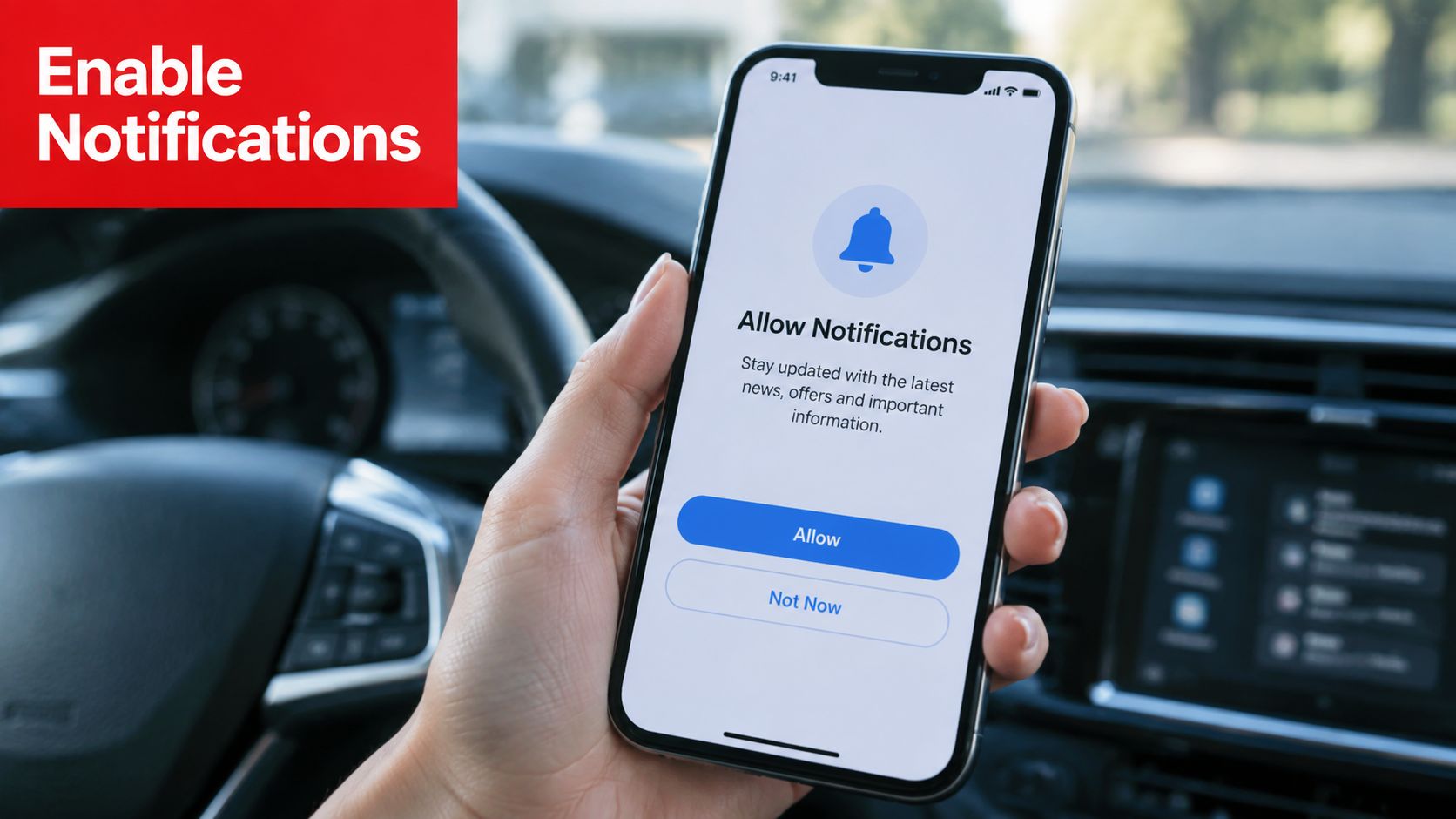
On iPhone, open the phone's notification settings, select the CarLock app, and allow notifications, sounds, badges, and any available critical-alert option that fits your use case. On Android, allow notifications for the app and review battery or background-use controls. Menu names differ between manufacturers, but look for settings such as battery optimization, sleeping apps, background activity, or unrestricted battery use.
Check these common blockers:
- Notification permission: Make sure the app is allowed to display alerts on the lock screen and in notification banners.
- Sound and focus modes: Review Do Not Disturb, Focus, silent mode, and scheduled bedtime settings. A notification may arrive without making a sound.
- Background access: Prevent the operating system from suspending the app when the screen is off.
- Mobile connectivity: Test alerts on the cellular connection you normally use, not only on home Wi-Fi.
- App updates: Keep the operating system and CarLock app current, then repeat a notification test after major updates.
CarLock can also use backup SMS and call notifications through the relevant account settings. Enable those channels when you need redundancy, particularly for critical security events or when you regularly work in places where app notifications may be delayed. The CarLock mobile app feature page provides product-level context for app-based monitoring.
Establish one reliable baseline
Send a low-risk test notification before configuring a large alert matrix. Confirm that it appears on the lock screen, produces the expected sound, and identifies the correct vehicle. If you use email, SMS, or calls as backup channels, verify each one separately rather than assuming that one successful push notification proves all delivery paths work.
Don't start with every channel for every event. Use push for routine real-time monitoring, reserve SMS or calls for the highest-priority conditions, and keep email for records or lower-urgency summaries. That arrangement makes urgent notifications easier to recognize when they arrive.
Enable the Right Alert Types for Your Vehicle and Lifestyle
The right alert set depends on the vehicle's normal routine. A car parked on a public street overnight needs a different balance from a company van that moves throughout the day or a family vehicle driven by a teenager.
Create a simple alert matrix before switching everything on. Write down the event, the people who need it, the response it should trigger, and the delivery channel. This prevents the common mistake of enabling every available notification without deciding what each one means.
Movement and engine start
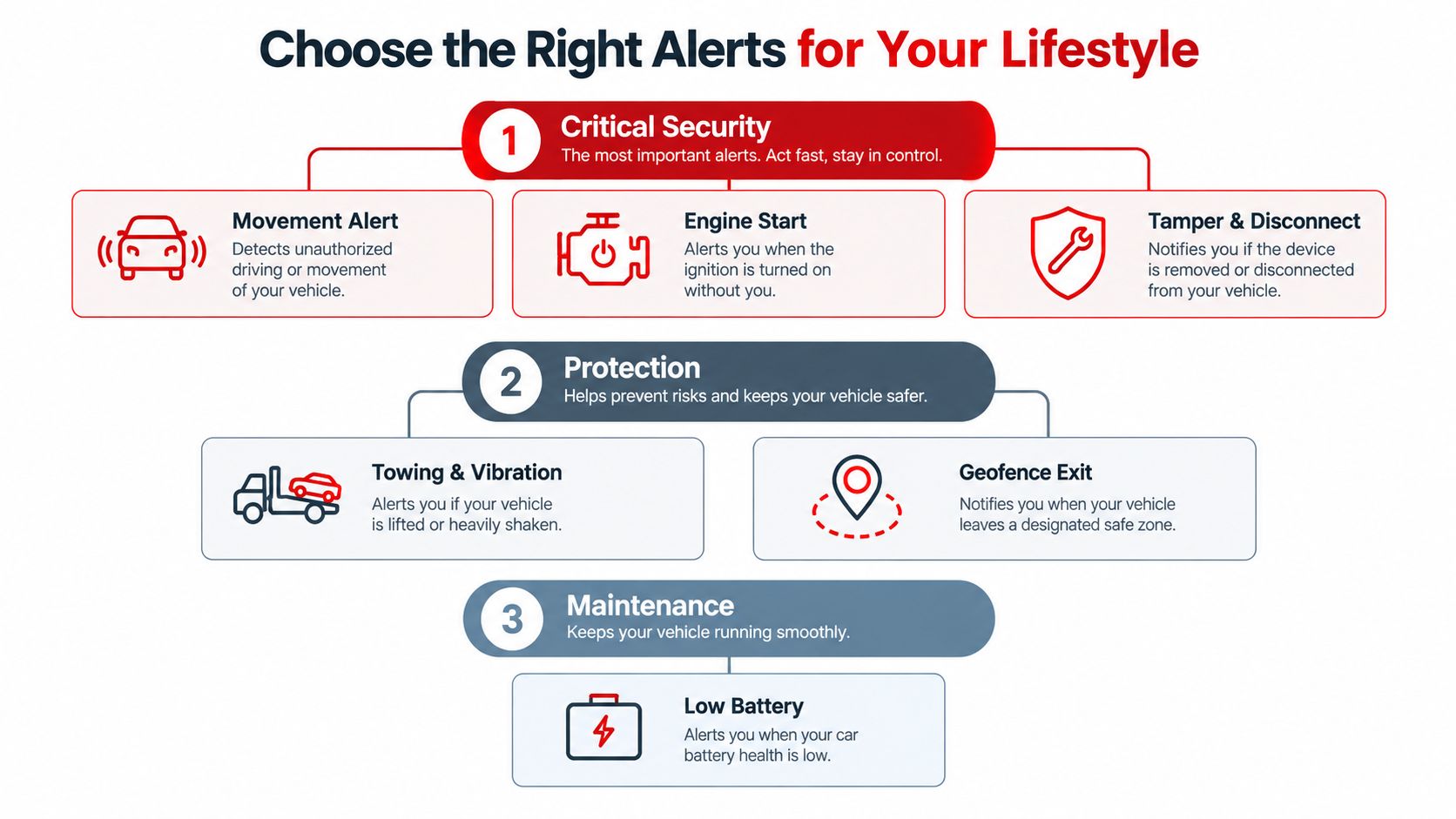
Movement alerts should sit near the top of the priority list for a vehicle that's meant to remain parked. They're useful when the car is left outside overnight, stored while you travel, or assigned to a driver who shouldn't be using it at a particular time. For a fleet, movement rules may need vehicle-specific schedules so ordinary dispatch activity doesn't create constant warnings.
Engine-start alerts answer a different question. Movement tells you the vehicle is rolling, while engine-start activity can provide earlier notice that someone has entered and started it. Parents may use it to confirm when a teen begins a trip. Owners of valuable or rarely used vehicles may treat an unexpected start as an immediate investigation trigger.
Towing, vibration, tampering, and disconnects
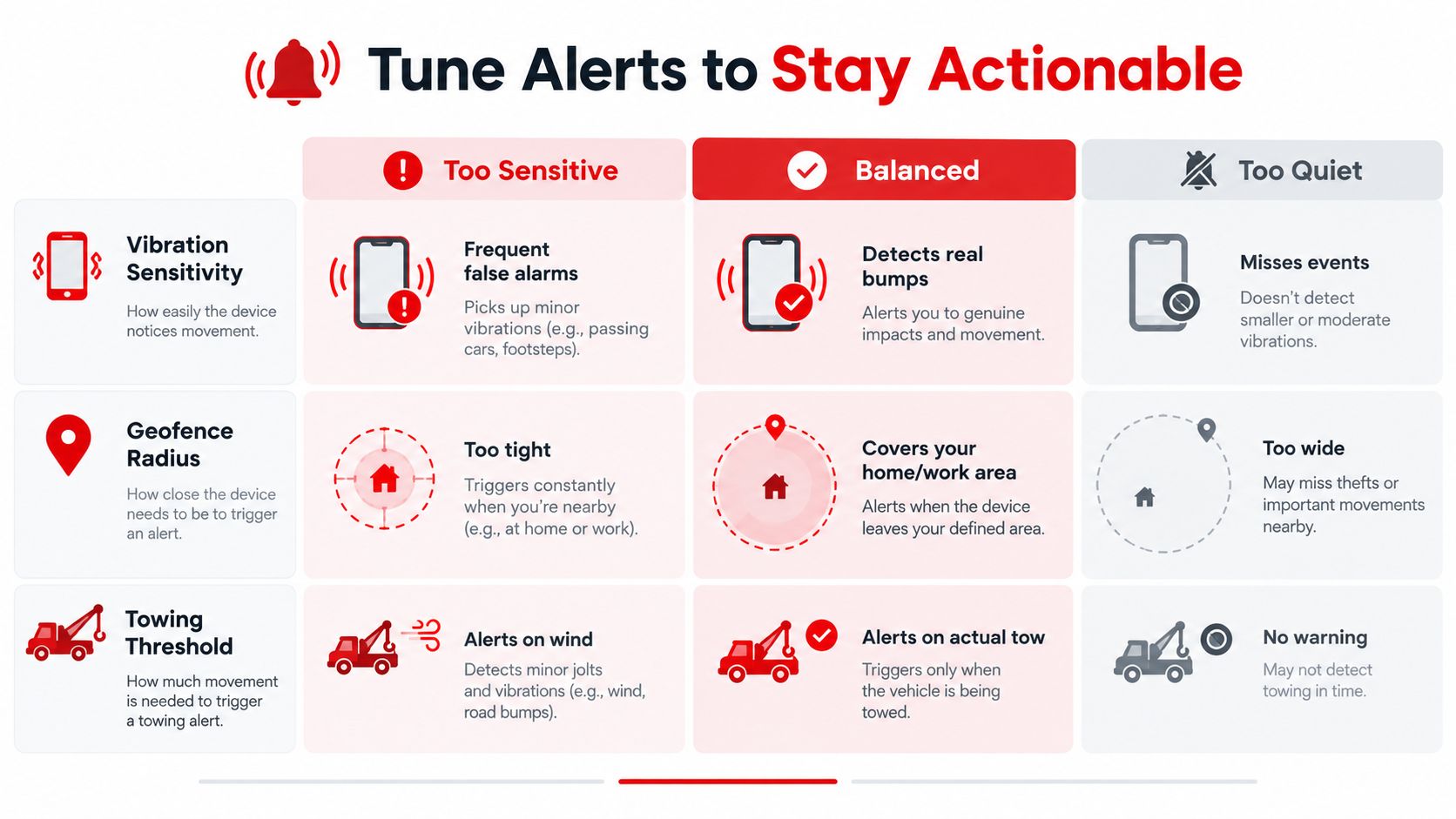
Towing and vibration alerts matter when the vehicle is parked and the engine isn't expected to run. A lifted vehicle, impact, attempted entry, or rough handling may produce vibration before the car travels far. These alerts need careful sensitivity tuning because wind, nearby heavy traffic, road construction, and garage conditions can create harmless movement.
Tamper and disconnect alerts deserve high priority. If someone removes the device or interrupts its connection, the absence of normal reporting can become part of the risk signal. Treat a disconnect differently from a low battery. One suggests a possible interference event, while the other may indicate an electrical or maintenance problem.
Battery and geofence events
A low-battery alert protects availability as much as it protects the car. If the vehicle battery is draining abnormally, the tracker may eventually lose its ability to report. Give this warning to the person responsible for maintenance, and escalate it when the vehicle is supposed to remain ready for use.
Geofence alerts work best around meaningful locations, such as home, a yard, a depot, or a workplace. They're useful for families who want to know when a vehicle leaves an agreed area and for fleet managers who need a simple exception signal. A geofence that's too small can fire during ordinary parking or GPS drift, while one that covers an entire neighborhood may fail to distinguish normal movement from an unauthorized departure.
Match rules to users
Use vehicle groups where the system supports them. A parent's personal car, a teen driver's car, and a work van shouldn't inherit identical settings because they share an account.
- Overnight street parking: Prioritize movement, engine start, tamper, disconnect, and towing alerts.
- Teen driver monitoring: Keep engine-start and movement alerts active, then add driving-behavior notifications where they lead to a clear conversation or intervention.
- Work vans and small fleets: Use geofences, movement schedules, harsh acceleration, and hard braking rules, but avoid sending every event to every employee.
- Rarely driven or valuable vehicles: Give unexpected movement, engine start, tampering, and battery changes immediate attention.
The CarLock device feature overview can help you compare the types of vehicle events the hardware is designed to observe. The important operational choice is not to enable everything. It's to decide which event deserves an immediate response and which can wait for a summary.
Tune Sensitivity and Delivery So Critical Alerts Stay Actionable
Alert selection is only half the job. Thresholds determine whether the system recognizes a meaningful event or reacts to every bump, GPS fluctuation, and ordinary change in vehicle state.
Use two gates whenever possible: magnitude and duration. A vibration must be strong enough to matter, and it may need to persist or appear across multiple readings before the system sends a warning. The same principle applies to towing and speed-related rules. A single unreliable GPS sample shouldn't carry the same weight as sustained movement supported by repeated measurements.
A telematics tow-alert example uses configurable distance, speed, speed-duration, and motion-sensitivity settings, with default examples including 1,000 m distance, 50 km/h speed, and 10 seconds above the threshold. The AAA driver monitoring report notes that GPS speed can become unreliable in poor signal conditions, which is why a sufficiently high threshold and multiple samples can reduce rogue tow alerts. Treat those values as implementation examples, not universal settings for every vehicle.
Build severity tiers
A useful three-tier model looks like this:
- Critical: Unexpected engine start, unauthorized movement, device tampering, or disconnect. Send push immediately, with SMS or call backup when the risk justifies escalation.
- Important: Towing, repeated vibration, geofence exit, or a meaningful battery change. Send push promptly and consider SMS for vehicles in exposed locations.
- Routine: Harsh braking, hard acceleration, trip summaries, or maintenance-related notices. Aggregate these into reports unless the event creates an immediate safety concern.
Fleet telematics research has examined speed, speed variation, hard braking, and hard acceleration across data from 4,000 vehicles in New York City, supporting the use of these events for monitoring driving behavior. The vehicle safety study supports the measurement of risky driving patterns, but the notification channel should reflect the response required. A fleet supervisor may review a behavior summary rather than receive a separate push for every hard brake.
Alert Priority and Delivery Matrix
| Alert Type | Recommended Priority | Best Delivery Channel | Sensitivity Tip |
|---|---|---|---|
| Unauthorized movement | Critical | Push, SMS or call backup | Require confirmed movement, not a single GPS fluctuation |
| Unexpected engine start | Critical | Push, with backup escalation | Limit to vehicles or schedules where the start is genuinely unexpected |
| Tamper or disconnect | Critical | Push and backup channel | Treat a confirmed interruption differently from a temporary signal delay |
| Towing or strong vibration | Important | Push, SMS for exposed vehicles | Use magnitude and duration gates to reduce wind and garage triggers |
| Geofence exit | Important | Push or grouped notification | Set the boundary around the real safe area, not a single parking point |
| Low battery | Routine or important | Push and email | Escalate when the vehicle is parked or needed for immediate service |
| Harsh braking or acceleration | Routine | Summary or fleet dashboard | Group events unless policy requires immediate intervention |
Your CarLock cloud tracking features are most useful when routing reflects the operational risk. Don't send a low-value event through the loudest channel just because the option exists.
False-positive control should be measured, not guessed. The ShakeAlert earthquake early-warning system reported a 7.4% false-alert rate across 95 magnitude-4.5-or-greater alerts, below the common requirement that no more than one in 10 alerts be false, according to the ShakeAlert performance discussion. The lesson transfers well to vehicle security: track false alerts, review recent events, and adjust thresholds instead of leaving the original settings untouched.
Test Every Alert to Confirm It Reaches You Instantly
A setup isn't complete until you've tested the alert path from vehicle event to human response. Test in a safe location, with the vehicle secured and no real theft or towing action involved. The purpose is to confirm delivery, not to imitate a dangerous situation.
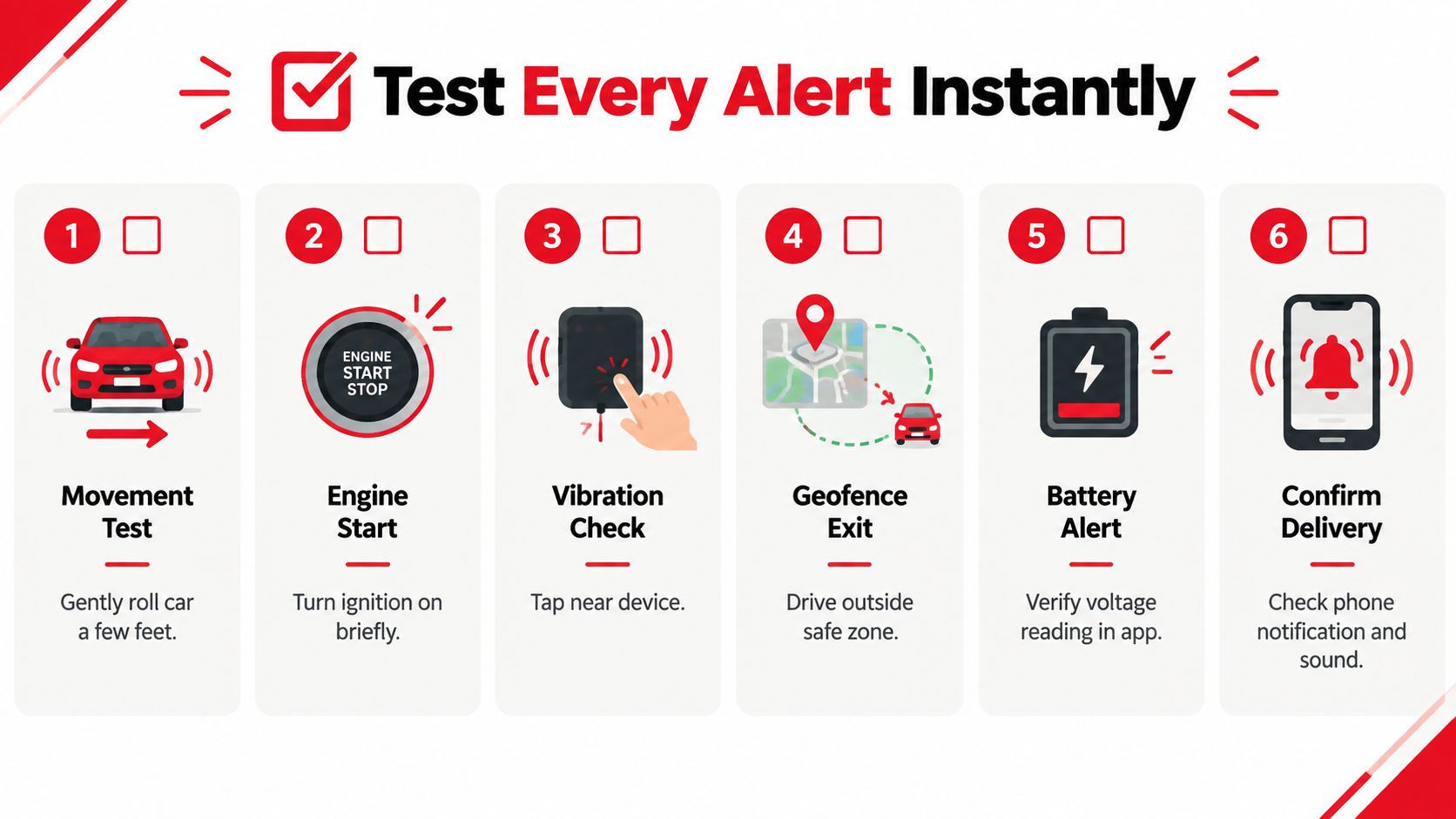
Run a controlled test routine
- Movement test: With permission and in a safe area, roll the vehicle a short distance and check whether the movement rule responds.
- Engine-start test: Turn the ignition on briefly while keeping the vehicle stationary. Confirm that the app identifies the event correctly.
- Vibration check: Tap near the device gently. Don't strike the vehicle or create damage. Check whether the configured sensitivity responds as expected.
- Geofence exit: Drive outside the safe zone only when you can do so safely and legally. Confirm that the boundary and notification are aligned.
- Battery review: Check the voltage or battery reading in the app and confirm that the maintenance warning is configured for the intended recipient.
- Delivery confirmation: Check the phone notification, sound, lock-screen appearance, SMS, email, or call path that you enabled.
Record the result in a basic log. Note the vehicle, event type, time, channel, whether the message identified the right vehicle, and whether the alert required a second attempt. Don't assume that a notification arriving eventually proves the system is ready. For a critical alert, confirm that the message is clear enough to tell you what happened and which vehicle needs attention.
Diagnose a missed notification
If nothing arrives, check the device's online status first. Then inspect app permissions, background access, battery optimization, Do Not Disturb, and account-level notification settings. If push works but SMS or calls don't, verify the relevant account settings and recipient details separately.
Repeat the test after a phone replacement, operating-system update, app update, vehicle service visit, device relocation, or electrical work. A system can remain enabled in the app while its delivery path has changed underneath it. Keep the test routine short enough that you'll repeat it.
Test the whole chain, not just the switch. The vehicle must detect the event, the service must process it, the channel must deliver it, and the person must recognize it.
Fix Common Issues and Apply Best Practice Presets
Most alert failures fall into a small set of categories. The device may be offline, the phone may suppress notifications, GPS may be uncertain, or the rule may never have existed for the event you care about.
Common problems and practical fixes
Silent notifications usually point to phone permissions, sound settings, Focus or Do Not Disturb modes, or background restrictions. Check the operating system first, then send a controlled test.
Delayed location can occur when the vehicle is underground, surrounded by obstructions, or in an area with weak connectivity. Don't interpret a delayed GPS position as proof that the vehicle hasn't moved. Use the event timestamp and the most recent reliable location.
False towing alerts in garages often result from a tight sensitivity setting, intermittent GPS, vibration from nearby activity, or a vehicle being moved slightly during service. Increase the required magnitude or duration, and create a maintenance procedure that temporarily accounts for authorized work without leaving the vehicle unprotected afterward.
Battery warnings need ownership. Decide who receives them and what action follows, such as inspecting the battery, checking accessories, or reviewing unusual drain. A warning without an assigned response becomes another ignored notification.
Coverage gaps are more serious than noisy rules. A vehicle may have movement monitoring but no clear disconnect rule, or a geofence may exist without a recipient. Review every vehicle state and ask, “If this changes unexpectedly, which rule tells me?” Monitoring platforms describe these omissions as coverage gaps, unmonitored entities, or rule gaps. The New Relic alert coverage documentation provides useful terminology for auditing missing coverage, even though vehicle systems have their own event models.
Use presets as starting points
For parents monitoring teen drivers, prioritize unexpected engine starts, movement, geofence exits, and selected driving-behavior events. Keep routine behavior in summaries unless it requires immediate intervention. A conversation about patterns is usually more useful than a phone that vibrates for every minor maneuver.
For fleet managers, assign alerts by vehicle group and responsibility. Use movement and geofences for unauthorized use, and review harsh acceleration and hard braking through a dashboard or scheduled report. Escalate only events that breach a written safety or operating policy.
For owners in high-theft areas, give immediate treatment to unexpected movement, engine start, tampering, and disconnects. The NHTSA lists California, Texas, Illinois, Florida, New York, Ohio, Pennsylvania, North Carolina, Washington, and Missouri among the top 10 states for vehicle theft in 2025 in its vehicle theft prevention information for safety marketing. Owners elsewhere should use local risk and parking conditions to choose their priorities rather than copying a state list.
Review the alert matrix after changes in drivers, parking locations, work schedules, vehicle servicing, or device placement. If operators feel annoyed or overwhelmed, raise thresholds, segment repeat offenders into a separate group, or convert lower-severity events into scheduled reports. Alert fatigue is a warning that the configuration needs tuning, not that the vehicle has become safer.
For product-specific questions about account behavior, notification settings, and device operation, use the CARLOCK support questions before changing rules blindly.
CARLOCK monitors vehicle movement, engine starts, vibration, towing activity, tampering, disconnects, and battery conditions through GPS, cellular connectivity, and its mobile app. Visit CARLOCK to review the system, then configure a small set of high-priority alerts and test every delivery channel before relying on it for daily vehicle protection.