

Driver’s Desk
What Is Fleet Tracking System
A fleet tracking system is a combination of GPS hardware and software that lets vehicle owners and managers monitor a vehicle's location, speed, and status in real time. In practice, the device in the vehicle collects GPS data, sends it over a cellular network, and many commercial systems can update as often as every 1 to 10 seconds.
That simple definition undersells what the technology does. The term ‘fleet' often suggests long-haul trucks, courier vans, or utility companies with rows of branded vehicles. But the same core system also makes sense for a plumber with three vans, a parent with a teen driver, or a car owner who wants a better theft-recovery tool than a siren in a parking lot.
Introduction What Is a Fleet Tracking System Really
A good way to think about fleet tracking is this: it gives a vehicle a digital voice. Instead of a car being silent until something goes wrong, the vehicle continuously reports where it is, how it's moving, and whether something unusual is happening.
That's why the question “what is fleet tracking system” matters beyond commercial logistics. The technology started as an operations tool, but it has become relevant anywhere a person needs visibility, accountability, or security around a vehicle.
It's more than a dot on a map
At the basic level, a fleet tracking system is a GPS-and-cellular telematics setup that lets managers monitor vehicle location, speed, routes, and related operational data in real time. One industry statistic cited by GoCodes reports that 69% of fleets are actively using GPS tracking solutions for logistics and operations, and 62% of fleet managers say GPS tracking increases efficiency, according to US Fleet Tracking's overview of fleet management.
Those figures matter because they change how you should think about the category. This isn't niche hardware for only the biggest operators. It's mainstream infrastructure for vehicle oversight.
Practical rule: If knowing where a vehicle is, where it went, or whether it moved unexpectedly would help you, fleet tracking is relevant to you.
Why the word fleet confuses people
The term “fleet” makes people assume scale is the defining feature. It isn't. The core idea is visibility across one or more vehicles from a phone or dashboard.
For a business, that can mean dispatching the closest van to a customer. For a family, it can mean checking whether a teen driver arrived where they said they were going. For an owner worried about theft, it can mean getting movement alerts before a stolen car disappears.
That broader view is why many people who start with a security concern end up learning about telematics, and many businesses that start with route management end up using the same data for safety and maintenance. If you want a broader business-side view of the software layer, this guide to fleet management software gives useful context on how tracking fits into daily vehicle operations.
For personal vehicle monitoring, the same concept shows up in tools built for individual users rather than dispatch teams, such as real-time car tracking systems.
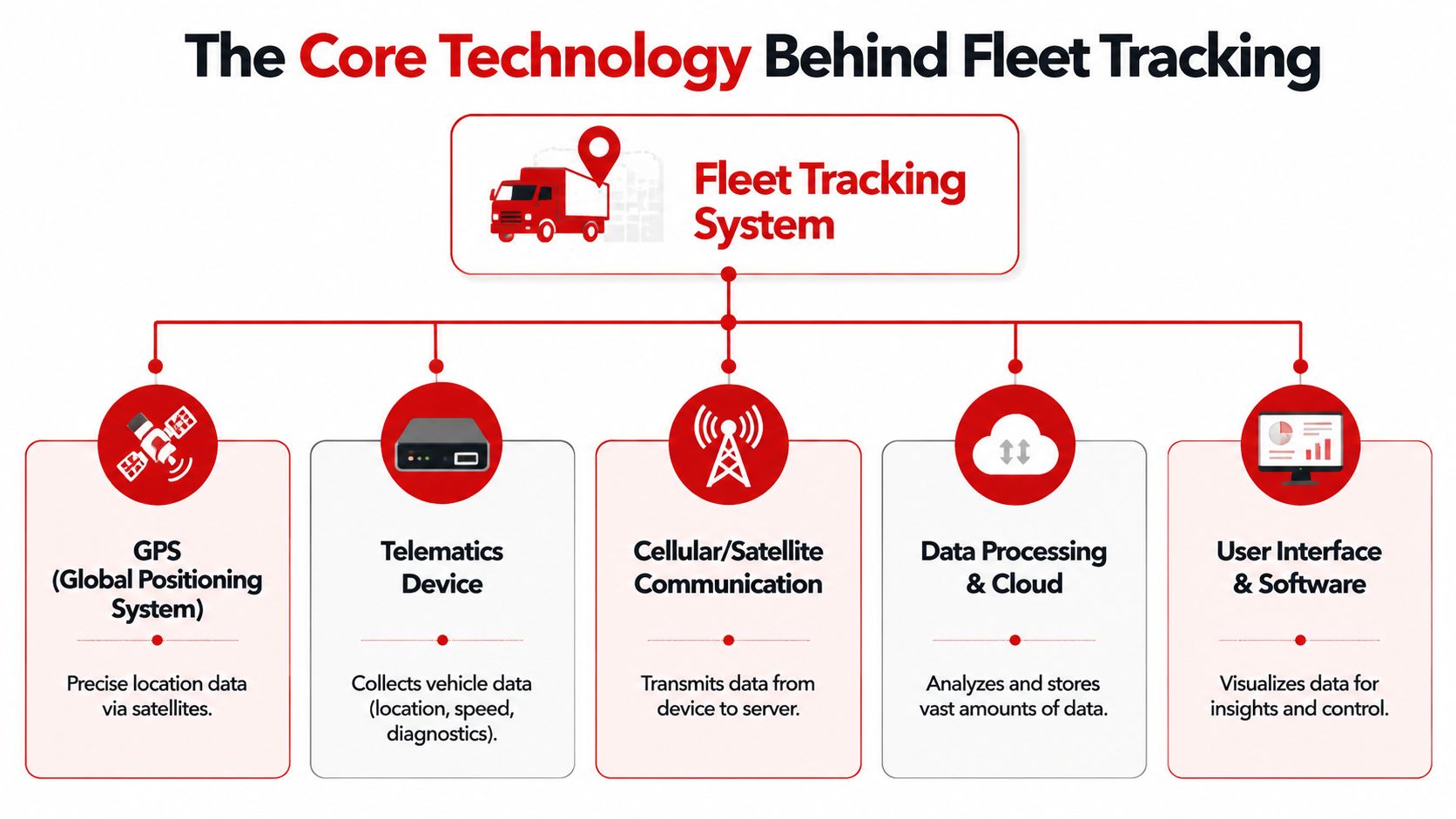
The Core Technology Behind Fleet Tracking
A tracking system feels simple on the surface. Open the app, check the map, get an alert. What makes it useful is the chain of technology behind that screen.
GPS is the location sensor
GPS, or more broadly GNSS positioning, answers the first question every owner asks. Where is the vehicle right now?
The device inside the car listens for signals from satellites and calculates the vehicle's position on the map. That sounds straightforward, but location by itself is only a starting point. A dot on a screen can confirm that a work van reached a customer, that a teen driver made it to school, or that a parked car has started moving when it should not be moving at all.
Update frequency also changes what the system is good at. Faster updates help with active monitoring and theft response. Slower updates are often enough for trip review and basic oversight.
Telematics adds the missing context
While GPS provides the location, telematics adds context by correlating that location with vehicle data.
That is the part many non-technical readers miss. Telematics is the reporting layer that turns raw movement into a usable story. Instead of only showing that a car moved, it can show how it moved, how long it sat idling, whether braking was harsh, and how mileage is accumulating over time.
A simple comparison helps here. GPS gives you the pin on the map. Telematics gives you the notes in the margin.
That extra context matters for both businesses and individuals. A company can use it to spot wasted fuel or uneven vehicle use. A parent can use it to review driving behavior. A car owner focused on theft can use it to separate ordinary movement from suspicious activity.
Cellular connectivity and cloud software make the data usable
The tracker still needs a way to send that information out of the vehicle. That is the job of cellular connectivity.
Once data leaves the car, cloud software stores it, organizes it, and turns it into something a person can act on. The dashboard is where location history, behavior signals, and security alerts come together. For small businesses and individual owners, that software layer is a big reason these systems are no longer limited to large dispatch operations. Tools built around cloud GPS tracking and remote alert features make the same core technology practical for a single family car or a handful of service vehicles.
The value comes from the ongoing flow of usable information, moving from vehicle to network to dashboard, in a form you can check quickly and understand without technical training.
How Fleet Tracking Systems Work Common Features
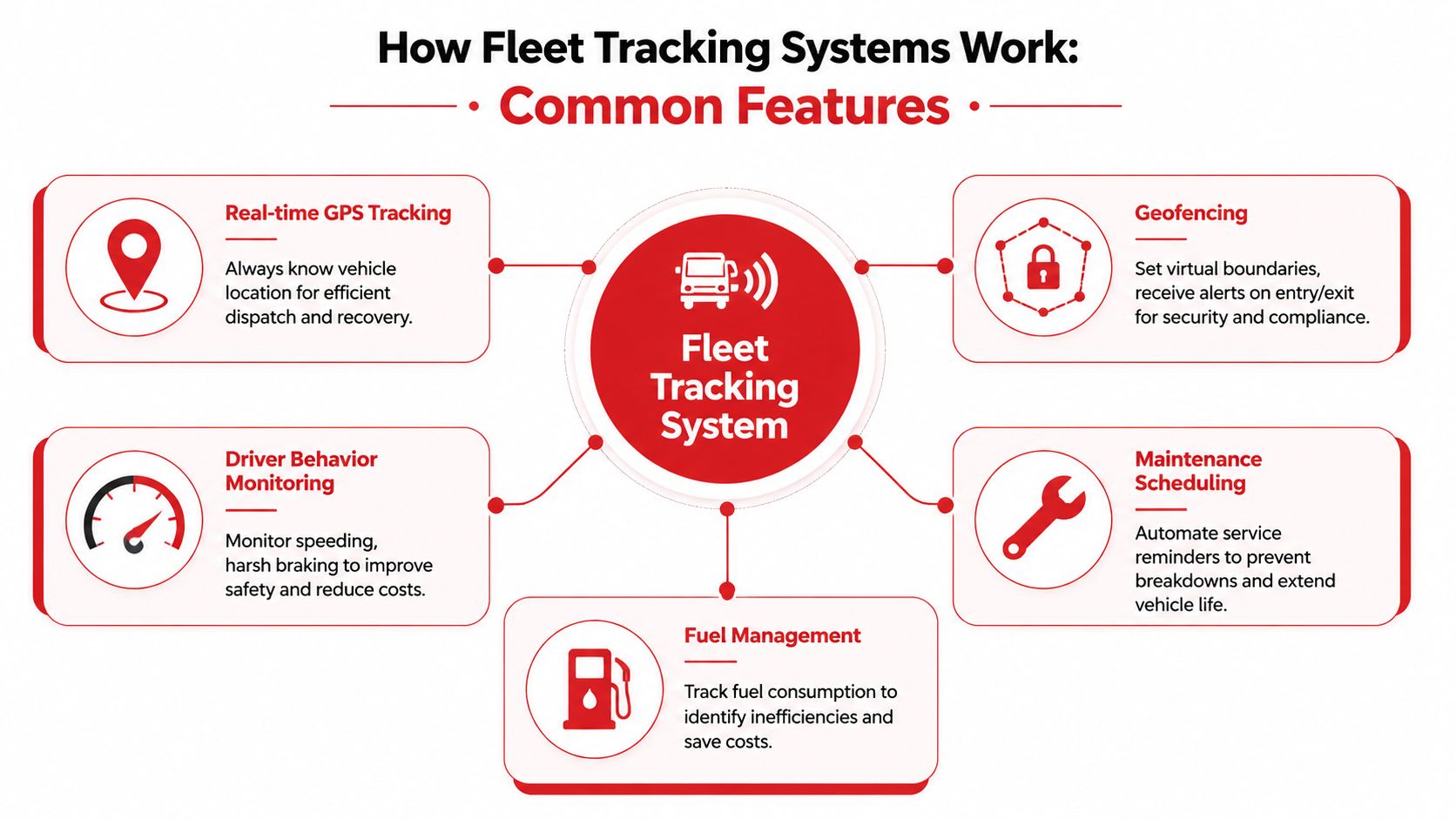
A fleet tracking system earns its keep through the features built on top of location data. The map pin matters, but its primary value comes from the rules, alerts, and history that turn motion into something you can interpret quickly.
Real-time tracking and trip history
Real-time tracking answers a simple question: where is the vehicle right now? Trip history answers the next one: where did it go, and in what order?
That combination matters because a single location can be misleading. A car sitting behind a store could belong there, or it could have taken a strange route to get there. Trip playback adds the missing context.
For a plumbing company, that helps confirm arrival times and route efficiency. For a parent, it shows whether a new driver took the expected path home. For an individual owner worried about theft, it can help reconstruct what happened after an unexpected move from a driveway or parking lot.
Geofencing in plain language
Geofencing is a digital fence drawn on a map.
You mark an area that matters, then the system watches for entry or exit. The area might be a home, school, office, warehouse, customer site, or neighborhood boundary. Once the car crosses that line, the software can send an alert.
A simple analogy helps here. Geofencing works like a motion sensor for places instead of rooms. Rather than detecting that something moved, it detects that a vehicle crossed a boundary you care about.
That makes geofencing useful far beyond large delivery fleets. A small business can confirm vehicles reached job sites. A parent can know when a teen driver leaves a set area. A car owner can treat the driveway or garage as a protected zone and get warned if the vehicle leaves unexpectedly.
Driver behavior and vehicle signals
Location is only one layer. Many systems also watch how the vehicle is being used.
That can include speeding, idling, harsh braking, route deviations, mileage buildup, or engine-use patterns. These signals help explain whether a trip looked normal, wasteful, risky, or suspicious. For business owners, that can mean spotting fuel waste or poor driving habits. For families, it can mean checking whether a young driver is braking hard or driving aggressively. For someone focused on theft prevention, unusual movement patterns can stand out faster than a map alone.
Here is what those features often look like in practice:
- Speed visibility: Shows whether a vehicle is being driven within expected limits.
- Idling records: Highlights time spent burning fuel while parked.
- Route deviation alerts: Flags trips that stray from normal paths or approved areas.
- Usage-based maintenance cues: Uses mileage or vehicle activity to support service timing.
Alerts are where tracking becomes practical security
Alerts change a tracking system from a record you review later into something that can demand attention right away.
If the device can notify you when a car starts, moves, vibrates, leaves a geofenced area, or begins a trip at an unusual hour, you get a chance to respond while the event is still happening. That matters for a fleet manager watching several vehicles, but it also matters for a family with one shared car or an owner worried about overnight theft. The same core technology serves both groups now, which is one reason tools once aimed mainly at large fleets have become relevant to everyday drivers.
Many buyers focus on these real-world behaviors more than the map itself, especially when comparing a vehicle tracking device with motion sensing and trip recording features.
A siren warns people nearby. A tracking alert warns the person who needs to act, with the time, place, and type of event.
Key Benefits And ROI For Different Users
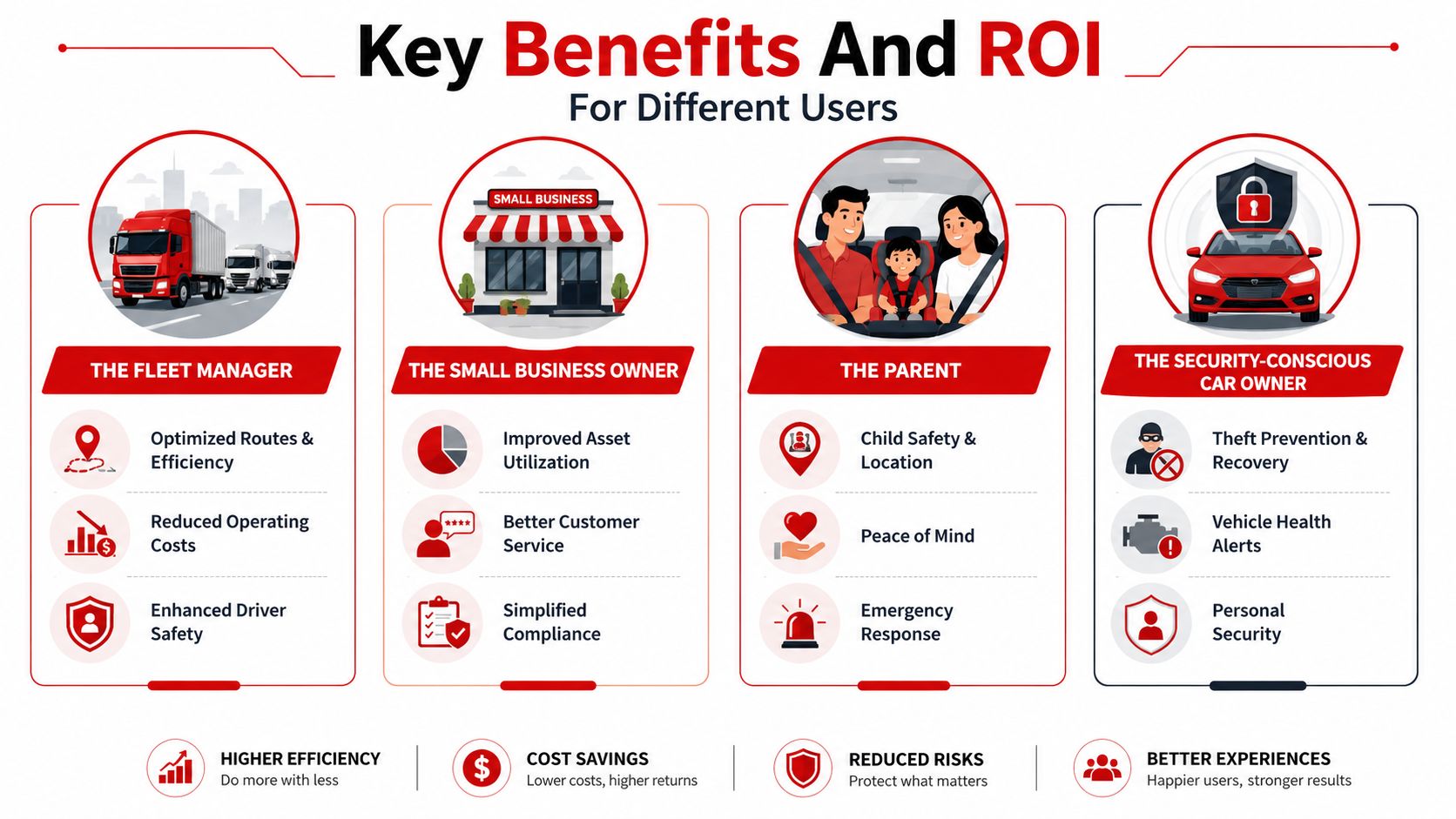
Fleet tracking delivers value in different ways depending on who's using it. A logistics manager will care about operating costs. A parent will care about safety. A car owner worried about theft will care about fast awareness and location history.
For fleet managers and operations teams
On the business side, the market itself shows how important this technology has become. A GoFleet summary citing Allied Market Research says the global fleet management market was valued at $16.3 billion in 2019 and was projected to reach $34.05 billion, and the same source notes that GPS fleet management can deliver 20 to 40% operational cost reduction through route optimization and fuel savings in some use cases, according to GoFleet's review of fleet tracking system features.
That helps explain the return on investment in practical terms:
- Route efficiency: Fewer wasted miles and less time spent on avoidable detours.
- Fuel control: Less idling and better route discipline can reduce waste.
- Maintenance timing: Using mileage or engine-hour data helps schedule service more intelligently.
- Operational visibility: Managers can act on problems while they're happening, not after the day is over.
A short explainer can make those business benefits easier to visualize:
For small business owners
Small businesses often sit in the middle. They don't think of themselves as running a “fleet,” but they still have vehicles, job schedules, and customer expectations.
A contractor with two vans, a cleaning company with several cars, or a local delivery team can use tracking to answer basic business questions quickly:
| User need | How tracking helps |
|---|---|
| Where's my vehicle? | Live location reduces uncertainty |
| Did the team reach the job site? | Arrival and route records provide confirmation |
| Why are fuel costs creeping up? | Driving and idling patterns can reveal waste |
| Which vehicle needs service first? | Usage-based data supports maintenance planning |
For parents and individual car owners
The return here isn't always measured in accounting terms. Sometimes the value is faster response, fewer blind spots, and less uncertainty.
For a parent, that can mean knowing whether a teen driver reached school, left a predefined area, or drove aggressively. For an owner focused on security, the benefit is knowing about suspicious movement quickly and having trip history available if the vehicle is taken.
Peace of mind sounds intangible until you need to answer a very concrete question: Where is the car right now?
How To Choose A System And Understand The Risks
Buying a tracking system without thinking through the tradeoffs is a common mistake. The hardware matters, but the app, alert logic, installation method, and privacy posture matter just as much.
What to check before you choose
Start with the actual problem you need to solve. Different systems are built for different priorities.
- Real-time visibility: If you need theft alerts or live dispatching, choose a system that reports continuously rather than one designed mainly for later review.
- Installation type: Some devices plug into an OBD-II port. Others are hardwired. Plug-in models are usually simpler to install, while hardwired systems may fit some use cases better.
- Alert quality: Good notifications should be specific and timely, not vague or noisy.
- App usability: If the dashboard is cluttered or confusing, the data won't help much.
- History and reporting: Some users need route playback. Others mainly need movement alerts and a clean mobile experience.
Privacy and security are not side issues
A tracking system handles sensitive data. It may reveal where a person lives, where employees work, where children travel, or when a vehicle is unattended.
That means you should read the provider's privacy materials carefully. Look for clear explanations of what data is collected, how it's stored, how long it's retained, and who can access it. If a company is vague about that, treat it as a warning sign.
For users comparing providers, reviewing a company's privacy policy and data practices is part of due diligence, not a legal afterthought.
A simple decision checklist
Use this as a practical filter:
- Define the main goal: Theft monitoring, driver oversight, dispatch, maintenance, or a mix.
- Match the hardware to the vehicle: Make sure installation fits your car or fleet.
- Test the app mentally: Would you know what to do if an alert arrived at night?
- Review data handling: Know what information the provider stores.
- Prefer clarity over feature overload: More features aren't better if they bury the important ones.
Many buyers focus first on price. That's understandable, but a cheaper tracker that reports poorly, sends weak alerts, or handles data carelessly can create more problems than it solves.
How CarLock Delivers Personal Car Security
Commercial fleet platforms often assume you're managing routes, teams, and dispatch workflows. Many individual drivers don't need all that. They need the same underlying tracking technology, but tuned for personal vehicle security and everyday monitoring.
The same core model, adapted for one car or a few
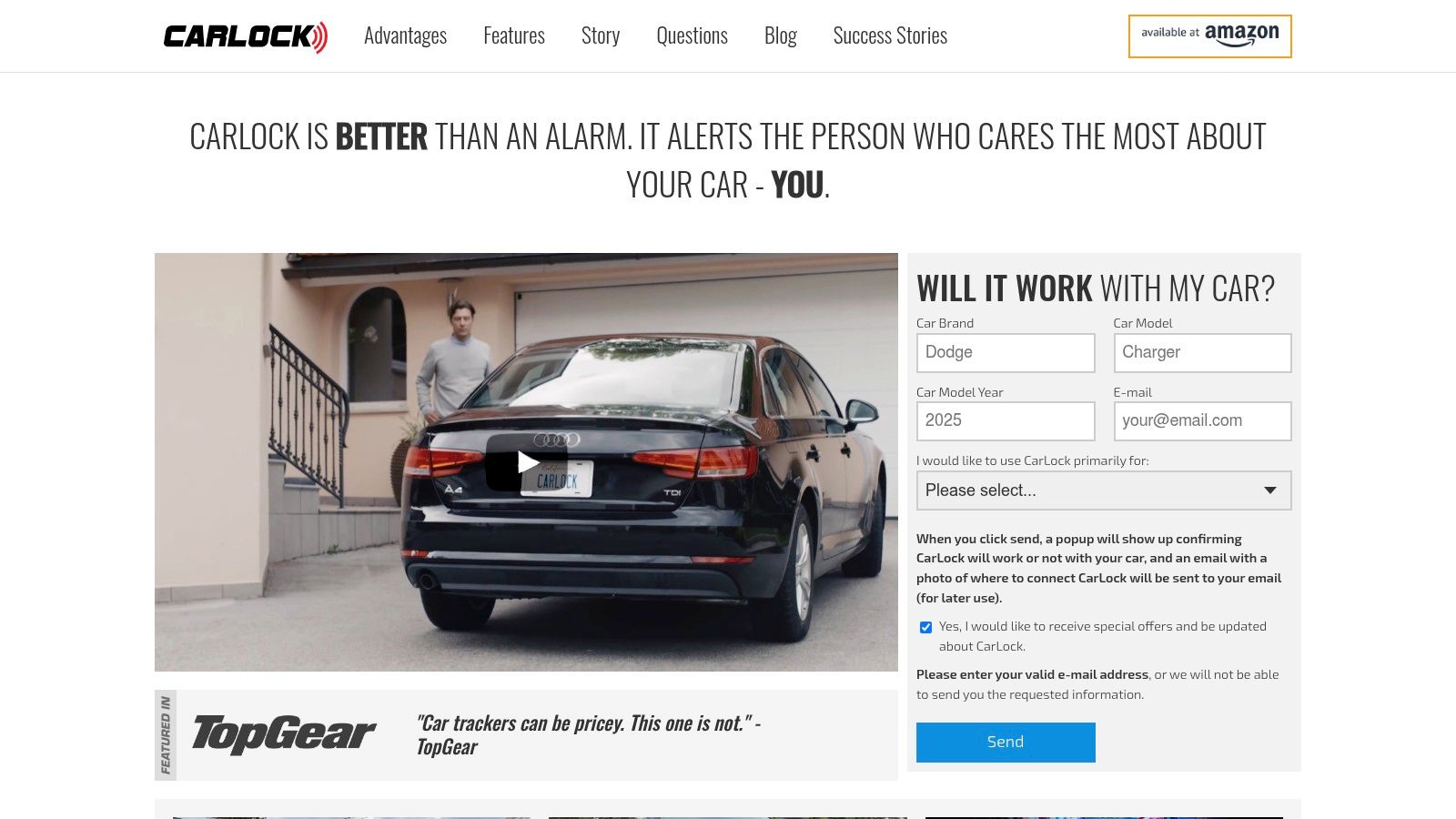
Products like CarLock's car security system are used for this purpose. The basic architecture is familiar: GPS location, cellular communication, cloud software, and mobile alerts. The difference is the use case.
Instead of helping a dispatcher coordinate a dozen service stops, the system is aimed at questions like these:
- Did the car move without permission?
- Was the engine started unexpectedly?
- Is the vehicle being towed or tampered with?
- Is someone driving the car aggressively?
- Was the device disconnected?
Those are security questions first, tracking questions second.
Why this matters for non-fleet users
A Bluetooth tag can help locate a bag or set of keys, but vehicle security usually calls for a purpose-built system that can keep reporting location and send direct alerts tied to vehicle events. That's the practical shift from “finding an item” to “monitoring a vehicle.”
For parents, that same setup can also provide visibility into harsh acceleration, hard braking, and other driving patterns. For small business owners with a handful of cars, it offers a lighter-weight way to monitor multiple vehicles without buying a full enterprise fleet stack.
If commercial fleet tracking is built around coordination, personal vehicle tracking is built around awareness and response.
That's why the evolution of fleet tracking matters. The technology didn't stay in trucking depots and enterprise control rooms. It moved into family driveways, apartment garages, and small business parking lots.
Frequently Asked Questions About GPS Tracking Systems
Is a GPS tracker better than a Bluetooth tag for a car
They solve different problems. A GPS tracker is built to monitor a vehicle through GPS and cellular connectivity. A Bluetooth tag depends on nearby devices in its ecosystem. For car security, a dedicated GPS-based system is usually the more appropriate category because it's designed around vehicle movement, alerts, and trip visibility. If you want a broader consumer-side comparison, this GM GROUP Services GPS guide is a useful companion read.
Why do many tracking systems require a subscription
Because the device isn't just storing data locally. It's sending data over a cellular network and supporting cloud access, alerts, and app functionality. The ongoing service is part of how the system stays connected.
Are these systems hard to install
Some are simple plug-in devices. Others are hardwired. The right choice depends on the vehicle, the use case, and how permanent you want the installation to be. For many personal users, setup is easier than they expect.
Can one account monitor more than one vehicle
Yes, many systems are designed to track multiple vehicles from one dashboard or app. That's one reason the line between “personal tracking” and “fleet tracking” is thinner than it used to be.
If you want a vehicle tracking system focused on security alerts, real-time GPS visibility, and mobile monitoring for everyday car owners, take a look at CARLOCK. It applies the same core tracking principles used in fleet systems to personal car protection, with features aimed at suspicious movement, tampering, towing, and trip awareness.