

Driver’s Desk
Vehicle Tracking Fleet Management System Guide
In the United States, 659,880 vehicles were reported stolen in 2025, a total that still represents roughly one stolen vehicle every 48 seconds, despite being 23% lower than in 2024. LiveViewGPS reports these national theft figures. For a fleet owner, that changes the buying question. A vehicle tracking fleet management system isn't primarily a map with moving icons. It's an operating and recovery system, and its value depends on whether it can help you act before a stolen vehicle becomes a permanent loss.
I've seen tracking rollouts fail for two opposite reasons. A three-van company buys an expensive enterprise dashboard nobody opens, while a large logistics operation buys cheap location pings that arrive too late to support dispatch, compliance, or recovery. The right system is the one that matches your risk, operating scale, cellular environment, and willingness to use the data.
| Fleet situation | Sensible starting point | What matters most | Common buying mistake |
|---|---|---|---|
| Personal vehicle or 1 to 3 vehicles | Consumer-grade GPS tracker | Theft alerts, tamper detection, trip history, mobile notifications | Paying for unused dispatch and compliance tools |
| Small service fleet | Mid-market tracking subscription | Live location, geofences, driver feedback, basic reporting | Choosing on feature count instead of alert reliability |
| Regional or multi-site fleet | Integrated fleet platform | ELD, fuel cards, maintenance, roles, route and dispatch control | Ignoring implementation and data ownership |
| Large commercial operation | Enterprise telematics platform | Scale, integrations, compliance, security, analytics | Treating every vehicle as an identical use case |
What a Vehicle Tracking Fleet Management System Actually Does
A vehicle tracking fleet management system performs two linked jobs. First, it locates vehicles through GPS or other satellite positioning, then uses cellular connectivity to transmit that information. Second, its software turns location pings into operational information for dispatch, maintenance, compliance, driver oversight, and theft recovery.
That distinction matters because buyers often use “tracking” and “management” as if they mean the same thing. They don't. A tracker can tell you where a vehicle is, but a management platform may also help decide which vehicle should take the next job, identify overdue maintenance, connect fuel activity with vehicle use, and produce compliance records.
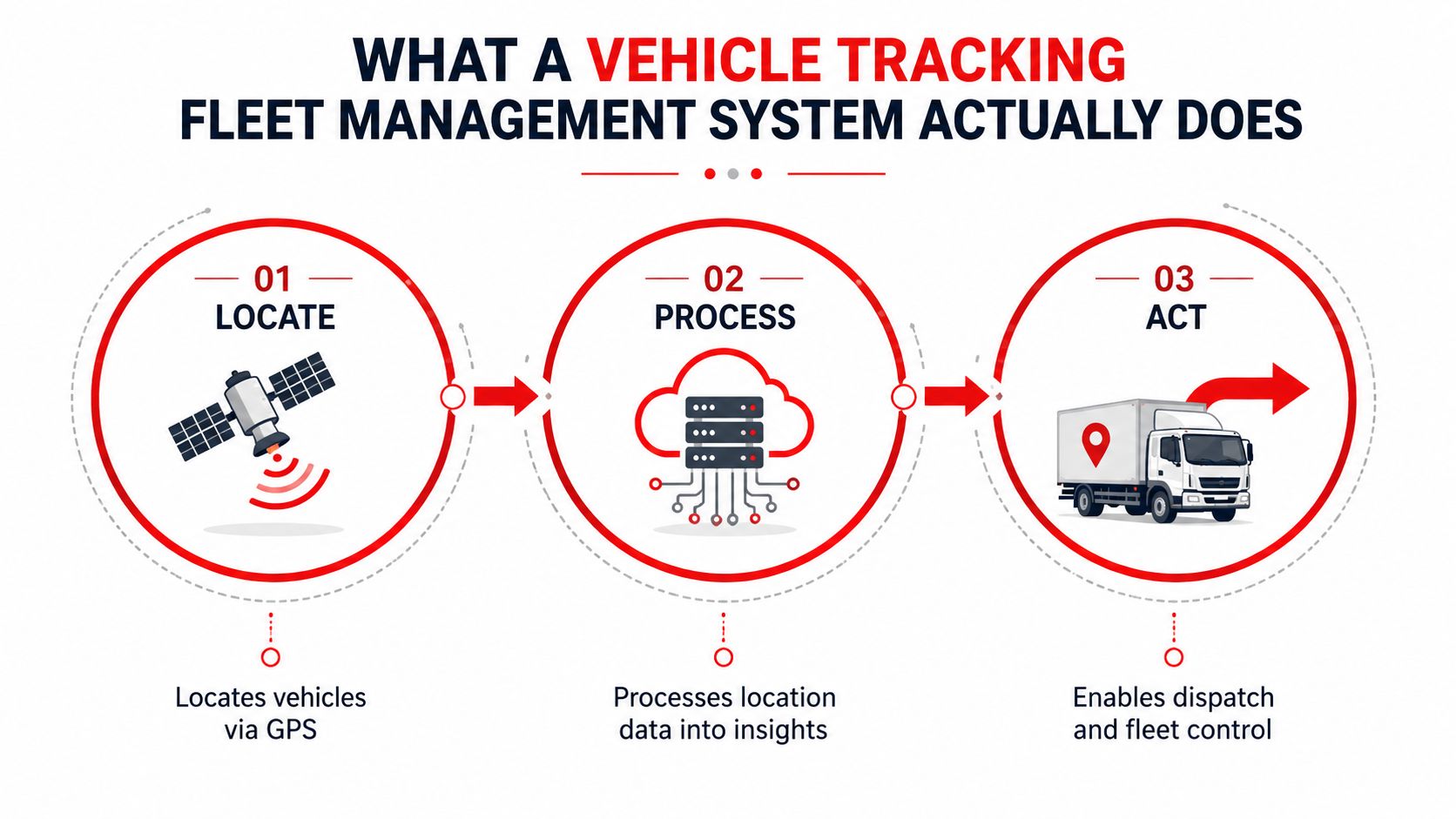
Separate the three system layers
Passive tracking records journeys and stores them for later review. It suits an owner who mainly needs mileage records, route history, or occasional verification, but it won't support a fast theft response if the device isn't transmitting while the vehicle is moving.
Active locating pushes current or near-current positions to an app. That's the layer you need for unauthorized movement alerts, after-hours activity, towing detection, and recovery coordination. For a small fleet, this may be enough.
Full fleet management adds workflows around the location data. It can assign routes, monitor driving behavior, schedule maintenance, connect with electronic logging devices and fuel cards, and give different managers controlled access. Larger fleets benefit because one operational event can affect several departments at once.
Before comparing vendors, write down the action you need the system to trigger. “Show vehicle location” is a visibility requirement. “Alert me when a van leaves the yard after hours” is a security workflow. “Recommend the closest available technician and record the job visit” requires a broader platform.
For a practical overview of how modern operators combine visibility with broader operational controls, consult this modern fleet management guide UK. If your requirement is mainly real-time vehicle security and location access, review the CarLock car tracking solution before paying for functions your team won't use.
How GPS Vehicle Tracking Works in Real Conditions
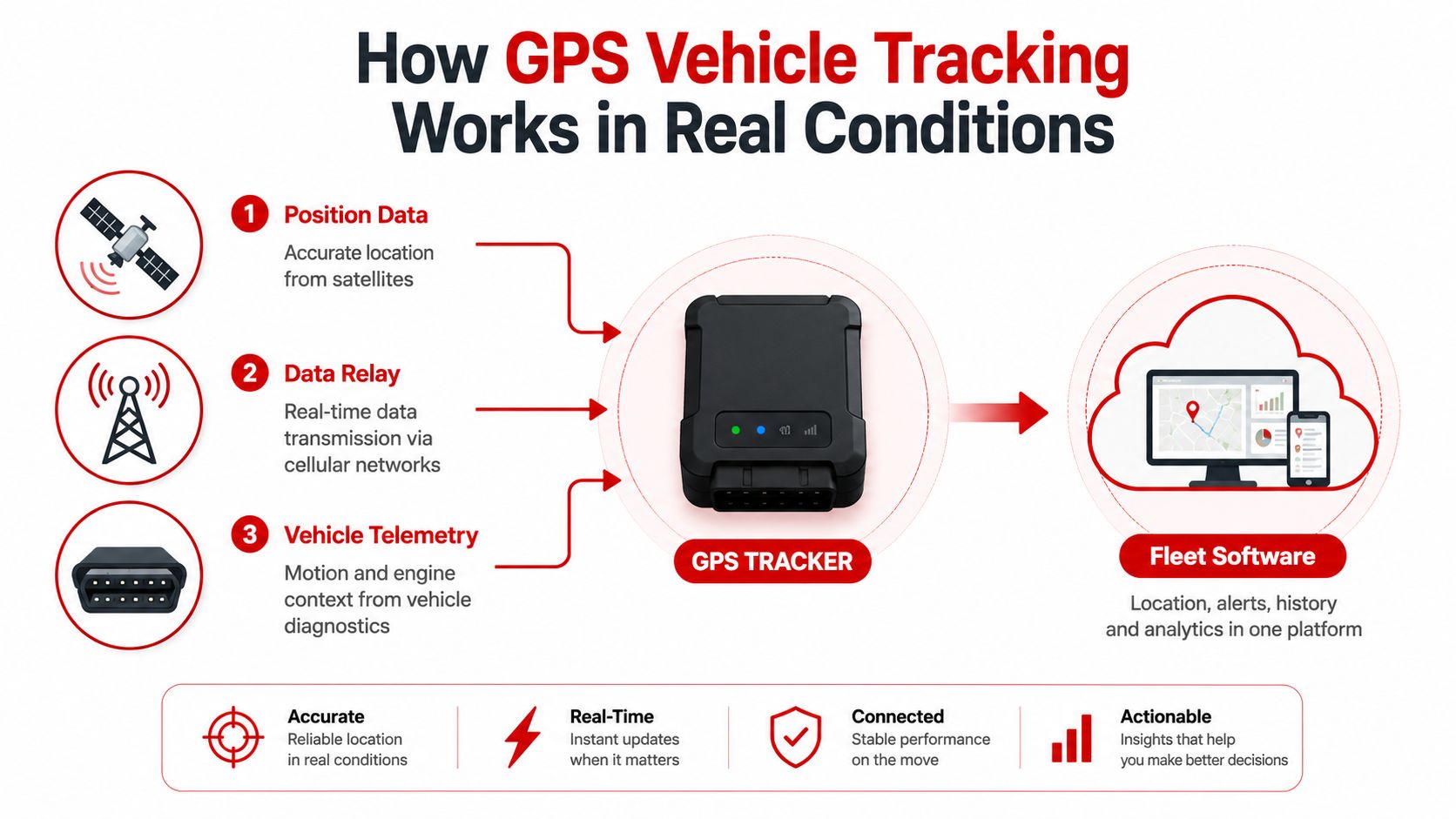
A tracker depends on three separate inputs, and each can fail for a different reason. GNSS satellites provide the position, cellular networks relay the data, and the vehicle's accelerometer or OBD/CAN connection adds motion and diagnostic context.
Satellite positioning usually isn't the operational bottleneck. The receiver may know where the vehicle is, but the platform can't show that position until the device sends it through an available communications network. A rural dead zone, underground garage, steel structure, or deliberate interference can interrupt that handoff even when the satellite receiver itself is functioning.
Update frequency controls the practical result
Modern fleet telematics platforms commonly use 10 to 30 second GPS update intervals for urban delivery and dispatch work, as documented in this research on GPS update timing. At 65 mph, the same source estimates positional uncertainty of about 300 feet after 10 seconds, 950 feet after 30 seconds, 1,900 feet after 60 seconds, and 2.2 miles after two minutes.
Those figures are more useful than a vendor's claim about nominal accuracy. A five-meter position can be perfectly adequate for dispatch, but it won't help much if the next update arrives a minute later. During theft recovery, the difference between a recent position and a stale position can determine whether responders search the right property, road, or parking area.
The device also needs motion context. An accelerometer can identify movement, vibration, hard braking, or towing. An OBD or CAN connection can provide vehicle information that supports engine and fault-code monitoring. These inputs help distinguish a vehicle that has been parked from one that has been moved, tampered with, or driven aggressively.
Practical rule: Evaluate the complete reporting chain, satellite reception, cellular coverage, storage behavior, alert delivery, and update interval. Accuracy on the specification sheet means little if the device stops reporting where your vehicles actually operate.
Connectivity deserves its own technical review, especially for small operators that may not have dedicated IT staff. This resource on smart device connectivity for SMEs offers useful context for assessing the communications layer. For historical movement analysis, verify that the product provides usable GPS route history, not just a current map position.
Core Features Worth Comparing Side by Side
Don't shortlist systems by counting features. Put the capabilities that affect daily decisions into columns, then test each vendor against the same operational examples. A polished dashboard can't compensate for slow alerts, poor exports, or an app that drivers and managers avoid.
| Feature | What To Evaluate | Minimum Acceptable | Strong / Enterprise Grade |
|---|---|---|---|
| Real-time GPS accuracy and update rate | Position quality, update cadence, parked and moving behavior | Current location with clear refresh behavior | Configurable intervals, historical replay, coverage and outage visibility |
| Geofencing and alert latency | Yard exits, restricted areas, after-hours movement, notification speed | Custom zones and mobile alerts | Rule-based alerts, escalation paths, audit logs, low false-alert volume |
| Driver behavior scoring | Speeding, harsh braking, acceleration, cornering, idling | Event visibility and trip context | Coaching workflows, trend scoring, policy configuration |
| Maintenance and fault-code integration | Odometer, engine hours, diagnostics, service reminders | Mileage-based reminders | Diagnostic codes, maintenance workflows, vehicle health integrations |
| Route and dispatch tools | Live assignments, stops, ETAs, rerouting | Vehicle map and basic trip review | Route optimization, traffic-aware dispatch, job and customer integration |
| Reporting and export depth | Scheduled reports, raw data, filters, retention | CSV or equivalent export | API access, role-specific dashboards, long-term analytics |
| Third-party integrations | ELDs, fuel cards, ERP, payroll, service systems | Documented integration options | Mature APIs, bidirectional workflows, implementation support |
| Mobile app quality | Alert clarity, permissions, usability, reliability | Fast access to location and alerts | Full operational control, granular roles, dependable notifications |
Test the system with real scenarios
Ask each vendor to demonstrate an after-hours yard departure, a stolen vehicle moving through a coverage gap, an engine fault, and a driver who repeatedly idles. Don't accept a guided tour that only shows the easiest screens.
Also inspect CarLock's GPS tracker features and app functions if your priority is vehicle-level monitoring rather than a full dispatch suite. The important question isn't whether the product has a feature. It's whether your team can configure it, understand the alert, and take the right action without calling support.
A serious evaluation should include data retention, alert delivery channels, user permissions, installation effort, cancellation terms, and export rights. Vendors often highlight route optimization while burying the terms that determine total cost of ownership.
Small Fleets vs Enterprise Fleets Compared
A five-truck HVAC company and a 280-vehicle logistics operation can both benefit from live location data. They shouldn't buy the same system.
Consider the HVAC company first. The owner wants to see which technician is closest to an urgent call, receive an alert if a van leaves the shared lot after hours, and review driver behavior for the newest hire. That operation doesn't need every vehicle connected to a complex compliance workflow. A clear mobile map, dependable alerts, trip history, and limited coaching may produce the practical result.
The larger logistics fleet has a different problem. Its managers need fuel-card integration, ELD compliance, route planning against traffic, maintenance scheduling tied to engine hours, and administrator roles across multiple regions. The value comes from connecting many operational records, not from watching individual dots on a map.
| Capability | Small Fleet, under 15 vehicles | Enterprise Fleet, 100+ vehicles |
|---|---|---|
| Live location | Direct owner or dispatcher visibility | Multiple teams, regions, and permissions |
| Geofencing | Yard security and customer-site verification | Complex site rules, escalations, and audit trails |
| Driver behavior | Targeted coaching and basic review | Policy-based scoring, coaching programs, trend analysis |
| Maintenance | Mileage reminders and simple service records | Engine-hour schedules, diagnostics, work-order workflows |
| Dispatch | Manual assignment using the live map | Route optimization, traffic data, job-system integration |
| Compliance | Only where the operation requires it | ELD, hours-of-service records, audits, and reporting |
| Reporting | Simple exports and weekly reviews | APIs, scheduled reports, data warehouses, role-specific views |
| Administration | One or two users | Regional roles, permissions, security controls |
Scale changes the value equation
Small fleets reach diminishing returns quickly. If nobody is dispatching continuously and there are no regulated hours to manage, a complex platform creates administrative work rather than removing it.
Enterprise fleets extract value from data density. A maintenance trend across many vehicles can reveal a recurring issue. Fuel-card records can be compared with vehicle movement. Regional managers can work from consistent rules instead of separate spreadsheets. That benefit only appears when the organization has the people and processes to use the information.
A small operator evaluating broader fleet visibility can review CarLock's cloud fleet management tools, then compare them with platforms built specifically for compliance and dispatch. Choose the least complex system that still closes your most expensive operational gap.
Pricing Models and Real ROI Considerations
Fleet tracking prices usually follow three structures. A per-vehicle subscription charges a recurring amount for each connected unit. Bundled tiers place features behind Basic, Professional, or Enterprise plans. A hardware-plus-service package separates the device purchase from the ongoing connectivity and software fee.
The requested arithmetic for a ten-truck fleet is straightforward. At $25 to $45 per vehicle per month, service costs $250 to $450 per month, or $3,000 to $5,400 annually, before hardware and other fees. Hardware at $80 to $200 per vehicle upfront adds $800 to $2,000 for ten vehicles. These rates are planning examples, not a universal market price, so verify every quote.
Build the business case from measurable losses
Use outcomes you can verify in your own records. A 2019 industry survey found that 55% of fleets reduced fuel costs with telematics software, while 42% saw fewer safety incidents, according to Teletrac Navman's fleet management statistics. A separate truck intervention study reported reductions in less severe unsafe events of 55% for sleeper-cab drivers and 60% for more severe unsafe events, with fuel economy improving 5.4% for sleeper cabs and 9.3% for day cabs. Those findings are summarized in this telematics intervention report.
Don't copy those results into your forecast. Measure your own idling, fuel consumption, unauthorized use, missed jobs, and theft exposure. Industry reporting estimates that idling can waste $3,500 to $4,500 per vehicle per year in a typical service fleet, as covered by Expert Market's fleet management data. That gives a useful category to investigate, not a guaranteed saving.
Check the quote for activation fees, contract minimums, feature access, installation, replacement devices, cellular overages, data retention, and cancellation charges. Then use this formula:
Payback period = total implementation cost ÷ monthly verified savings and avoided losses.
Include recovery value only if you can explain how the system would improve your response. Don't count a theoretical insurance reduction unless your insurer confirms it in writing.
When a Simple Tracker Beats a Full Platform
Every fleet doesn't need enterprise software. A sole proprietor with two vans, a landscaping crew with three trucks, or a real estate agent tracking personal and business mileage may never use route optimization, ELD workflows, regional permissions, or complex reports.
For those operators, the useful outcome is narrower. They want to know when a vehicle moves without authorization, whether someone starts the engine, whether towing or unusual vibration occurs, where the vehicle has been, and whether a driver is using it aggressively. A consumer-grade tracker with strong theft detection, dependable alerts, and a clear smartphone app can cover that job without creating a second administrative system.
CarLock's car locator capability is relevant to this lower-complexity use case because its product positioning centers on real-time vehicle location, trip history, movement alerts, engine-start notifications, tamper or disconnection alerts, unusual vibration detection, and battery warnings. It uses GPS and cellular connectivity rather than Bluetooth proximity, which is an important distinction for a vehicle that may be far from the owner's phone or other nearby devices.
Use this cutover test
A simple tracker is usually the more honest choice when:
- The fleet is small: One person can monitor alerts without a dedicated dispatcher.
- The risk is theft or misuse: Recovery and driver awareness matter more than compliance automation.
- The vehicles are straightforward: You don't need ELD-grade records, complex diagnostics, or multi-site permissions.
- The dashboard would go unused: A feature that nobody logs into has no operational value.
- The subscription exceeds the exposure: If the recurring cost is greater than the realistic savings from reduced unauthorized use, fuel waste, and recovery response, don't buy it.
The "80 percent of the value" claim often used in sales conversations shouldn't be treated as a measured statistic. The test is functional coverage. List the decisions you make each week, then purchase only the system that supports those decisions reliably.
Do not confuse simple with weak. A focused theft-monitoring product can outperform a larger platform when the larger platform buries urgent alerts under reports nobody reviews.
Choosing the Right Vehicle Tracking Fleet Management System Fit
Start with four questions, and answer them before requesting demonstrations:
- How many vehicles need monitoring?
- Is the primary risk theft, misuse, dispatch delay, maintenance, or compliance?
- Who will watch alerts and act on them every day?
- Where do the vehicles operate, and how dependable is cellular coverage there?
The answers point toward three practical solution tiers.
| Buyer profile | Best-fit category | Priorities |
|---|---|---|
| 1 to 3 vehicles | Consumer-grade tracker | Theft recovery, tamper alerts, driver feedback, mobile access |
| 5 to 25 vehicles | Mid-market subscription | Live oversight, geofences, trip history, basic dispatch and reporting |
| Larger or regulated operation | Enterprise platform | Compliance, route optimization, integrations, maintenance, multi-site control |
For the lower end, CarLock fits a small-fleet and personal-vehicle use case through plug-and-play OBD installation, smartphone-first alert delivery, trip history, real-time location monitoring, and a low-complexity operating model. Its value depends on the same condition as every cellular tracker, the device must be able to communicate in the areas where the vehicle operates. For underground, remote, or hostile environments, ask the vendor exactly how it stores and transmits data during interruptions, and how it detects disconnection or tampering.
Use this vendor checklist
- Risk match: Does the system address your primary loss, or does it mainly showcase unrelated features?
- Alert test: Can the vendor demonstrate movement, towing, geofence, tamper, and battery alerts?
- Coverage proof: Can you test the device at your yard, garages, rural routes, and known dead zones?
- Update behavior: What happens when cellular service disappears, and when does stored data resume?
- Installation: Is OBD plug-in sufficient, or do you need hardwired equipment?
- Data control: Can you export trip, alert, driver, and maintenance records?
- User adoption: Can the person responsible for alerts understand the mobile workflow immediately?
- Total cost: Does the quote include hardware, activation, support, replacements, integrations, and cancellation?
- Pilot plan: Can you test representative vehicles before a full rollout?
Choose the platform that closes the largest operational gap with the fewest unused layers. CARLOCK offers real-time GPS vehicle monitoring, trip history, movement and tamper alerts, driver-behavior visibility, and smartphone access for owners and small fleet operators. Visit CARLOCK to assess whether its focused vehicle-security approach fits your fleet before committing to a broader management system.